Free Shipping on Domestic Orders $75+

Disassembling VTech MobiGo Touch Learning System Screen Enclosure

Views: 3K

View statistics:

Past 24 Hours:
4
Past 7 Days:
22
Past 30 Days:
95
All Time:
2,957
Comments: 1

1 guide comment.

Go to guide comments
Completed: 2

2 people have marked this guide "completed." Will you be next?

Favorites: 2

2 people have favorited (and subscribed to) this guide. Will you be next?

Time Required: 10 minutes
Difficulty: Moderate
Disassembling VTech MobiGo Touch Learning System Screen Enclosure

Introduction

Go to step 1 ↓

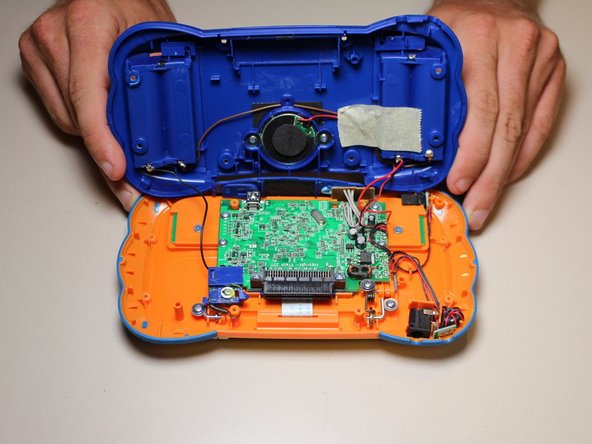
The VTech has two cases. The main case housing the main circuit board and other components and a smaller enclosure that houses the screen and two buttons. This guide is how to disassemble the Vtech to gain access to the screen and button components.

What you need

Tools

    1. Disassembling VTech MobiGo Touch Learning System Screen Enclosure, Case: step 1, image 1 of 1
      • Remove the battery covers and the four batteries.

      Ask FixBot

      Add Comment

    2. Disassembling VTech MobiGo Touch Learning System Screen Enclosure: step 2, image 1 of 2 Disassembling VTech MobiGo Touch Learning System Screen Enclosure: step 2, image 2 of 2
      • Remove the four plastic caps with a metal spudger to expose the 6.0 mm Philips JIS #0 case screws.

      • Remove the eight 6.0 mm JIS #0 case screws.

      Ask FixBot

      Add Comment

    3. Disassembling VTech MobiGo Touch Learning System Screen Enclosure: step 3, image 1 of 2 Disassembling VTech MobiGo Touch Learning System Screen Enclosure: step 3, image 2 of 2
      • Using a plastic opening tool, separate the two pieces of the case carefully.

      Ask FixBot

      Add Comment

    1. Disassembling VTech MobiGo Touch Learning System Screen Enclosure, Disassembling VTech MobiGo Touch Learning System Screen Enclosure: step 4, image 1 of 1
      • Remove the three 4.0 mm Philips J0 screws holding the "L" shaped brackets in place.

      Ask FixBot

      Add Comment

    2. Disassembling VTech MobiGo Touch Learning System Screen Enclosure: step 5, image 1 of 1
      • Remove the three "L" shaped brackets and the spring.

      Ask FixBot

      Add Comment

    3. Disassembling VTech MobiGo Touch Learning System Screen Enclosure: step 6, image 1 of 1
      • Flip the device over and remove the three 4.0 mm Philips J0 case screws.

      Ask FixBot

      Add Comment

    4. Disassembling VTech MobiGo Touch Learning System Screen Enclosure: step 7, image 1 of 1
      • Separate the front and back of the case.

      • Use a plastic opening tool if necessary.

      Ask FixBot

      Add Comment

Conclusion

To reassemble your device, follow these instructions in reverse order.

Cancel: I did not complete this guide.

2 other people completed this guide.

Daniel Kresge

Member since: 09/01/15

409 Reputation

4 Guides authored

Team

USF Tampa, Team 8-3, Eyestone Fall 2015 Member of USF Tampa, Team 8-3, Eyestone Fall 2015

USFT-EYESTONE-F15S8G3

3 Members

72 Guides authored

1 Guide Comment

Does anyone know what company in china sells the touch screen replacement?

Anthony Shaw - Reply Share

Add Comment

View Statistics:

Past 24 Hours: 4

Past 7 Days: 22

Past 30 Days: 95

All Time: 2,957