
Disassembling Toshiba A1304T Front Cover

Christopher and 6 other contributors
Last updated on Jan 28, 2014
Views: 2.7K
View statistics:
- Past 24 Hours:
- 2
- Past 7 Days:
- 20
- Past 30 Days:
- 98
- All Time:
- 2,728
Comments: 0
No one has left comments on this guide. Will you be first?
Go to guide commentsCompleted: 0 1
No one has marked this guide "completed." Will you be the first?
1 person has marked this guide "completed." It's you — great job!
Favorites: 0 1
No one has favorited (and subscribed to) this guide. Will you be the first?
1 person has favorited (and subscribed to) this guide — and that's you!
Action Shots
Be an action hero! This guide needs images that better demonstrate how to perform specific actions.
Needs Better Images
Better photos will improve this guide. Help out by taking, editing, or uploading new ones!
Introduction
Go to step 1 ↓Use this guide to disassemble the Toshiba A1304T.
If you can't get a hold of a Torx 6 Security Screwdriver, a small flathead can be used as a substitute
What you need
Tools


-
-
-
Open the phone so that it matches the photos to the left.
-
Using a thumb-tack, push-pin, or similar pin, remove the four plastic stoppers located around the main LCD screen.
 Ask FixBot
-
-
-
With the T8 Torx Security Bit Screwdriver, remove the four screws in the designated locations.
-
-
-
-
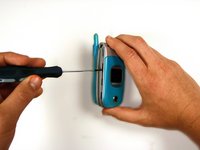
Insert the head of a flathead screwdriver into the seam between the front cover and the phone.
-
Pry gently until the cover gives slightly to create a slightly wider opening. You may hear a distinct pop as you pry.
-
Remove the screwdriver and re-insert it into another portion of the seam. Continue making gaps around the cover of the phone until it is completely detached from the body.
-
-


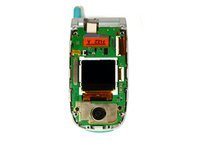
To reassemble your device, follow these instructions in reverse order.

Team

Cal Poly, Team 16-6, Maness Spring 2010 Member of Cal Poly, Team 16-6, Maness Spring 2010
CPSU-MANESS-S10S16G6
4 Members
96 Guides authored
