Free Shipping on Domestic Orders $75+

Disassembling Sprint Sanyo RL-4920 Outer Case

What you need

  1. Disassembling Sprint Sanyo RL-4920 Outer Case, Back of Phone: step 1, image 1 of 1
    • Flip the phone over so that the screen is facing down.

    Ask FixBot

    Add Comment

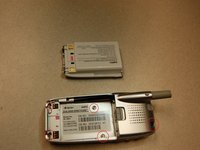
  2. Disassembling Sprint Sanyo RL-4920 Outer Case, Remove Battery Pack: step 2, image 1 of 2 Disassembling Sprint Sanyo RL-4920 Outer Case, Remove Battery Pack: step 2, image 2 of 2
    • Push the gray lever up towards the top of the phone.

    • Pull up on the battery pack and completely separate it from the phone.

    Ask FixBot

    Add Comment

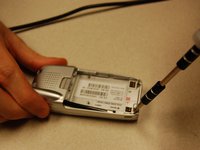
  3. Disassembling Sprint Sanyo RL-4920 Outer Case, Screws: step 3, image 1 of 2 Disassembling Sprint Sanyo RL-4920 Outer Case, Screws: step 3, image 2 of 2
    • Locate the five screws around the back casing.

    • Use a three-prong screw bit to remove all five screws.

    Ask FixBot

    Add Comment

  4. Disassembling Sprint Sanyo RL-4920 Outer Case, Separate Cases: step 4, image 1 of 1
    • Use the plastic opening tool and slide it around the phone to pull apart the front and back casing.

    Ask FixBot

    Add Comment

  5. Disassembling Sprint Sanyo RL-4920 Outer Case, Separate Cases: step 5, image 1 of 1
    • Separate the two cases.

    Ask FixBot

    Add Comment

  6. Disassembling Sprint Sanyo RL-4920 Outer Case, The Front Case: step 6, image 1 of 1
    • Use the plastic opening tool to remove the motherboard from the front case.

    Ask FixBot

    Add Comment

Conclusion

To reassemble your device, follow these instructions in reverse order.

Cancel: I did not complete this guide.

One other person completed this guide.

Austin Shores

Member since: 10/18/13

301 Reputation

3 Guides authored

Team

Clemson, Team 13-5, Benson Fall 2013 Member of Clemson, Team 13-5, Benson Fall 2013

CLEM-BENSON-F13S13G5

3 Members

18 Guides authored

0 Guide Comments

Add Comment

View Statistics:

Past 24 Hours: 3

Past 7 Days: 8

Past 30 Days: 30

All Time: 555