Free Shipping on Domestic Orders $75+

Disassembling Sony Ericsson w600i Back Housing

What you need

    1. Disassembling Sony Ericsson w600i Back Housing, Disassembling Sony Ericsson w600i Battery Cover: step 1, image 1 of 1
      • Grip the lower portion of the back of the phone and slide downwards.

      Ask FixBot

      Add Comment

    1. Disassembling Sony Ericsson w600i Back Housing, Battery: step 2, image 1 of 1
      • Lift battery at the rounded notch near the bottom of the phone.

      Ask FixBot

      Add Comment

    1. Disassembling Sony Ericsson w600i Back Housing, Back housing: step 3, image 1 of 1
      • Unscrew the four Torx screws from the backplate.

      • The backplate may begin to separate from the keypad face. Do not try to remove it yet.

      • The screws are T5 Torx screws, 5.6mm.

      Ask FixBot

      Add Comment

    2. Disassembling Sony Ericsson w600i Back Housing: step 4, image 1 of 1
      • Swivel the phone open.

      Ask FixBot

      Add Comment

    3. Disassembling Sony Ericsson w600i Back Housing: step 5, image 1 of 1
      • Using the Spudger, gently pry up the U-shaped grey cover below the keypad.

      • The cover is secured with adhesive tape. The gentler this is removed, the easier it will be to reassemble.

      Ask FixBot

      Add Comment

    4. Disassembling Sony Ericsson w600i Back Housing: step 6, image 1 of 1
      • Remove the two Torx screws from below the cover.

      • These are T5 Torx screws, 8.6mm.

      Ask FixBot

      Add Comment

    5. Disassembling Sony Ericsson w600i Back Housing: step 7, image 1 of 1
      • Gently work a spudger or a fingernail between the keypad face and the backplate.

      • The pieces are clipped together most tightly at the bottom loop section.

      Ask FixBot

      Add Comment

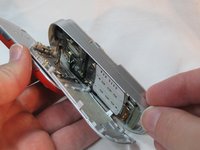
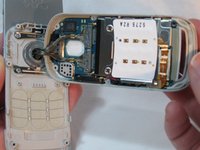
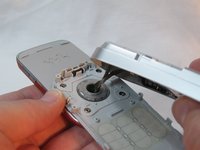
    6. Disassembling Sony Ericsson w600i Back Housing: step 8, image 1 of 2 Disassembling Sony Ericsson w600i Back Housing: step 8, image 2 of 2
      • Separate the keypad face from the backplate.

      • The keypad keys and the button component are both loose inside the phone, so take note of their orientation in case they become dislodged.

      • Take note of the braided cord's state. Upon reassembly it should be returned to the same orientation.

      Ask FixBot

      Add Comment

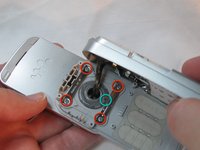
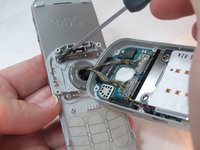
    7. Disassembling Sony Ericsson w600i Back Housing: step 9, image 1 of 3 Disassembling Sony Ericsson w600i Back Housing: step 9, image 2 of 3 Disassembling Sony Ericsson w600i Back Housing: step 9, image 3 of 3
      • Holding the backplate away from the swivel, remove the 4 small Phillips screws and both stamped struts from the swivel assembly.

      • Note that only the bottom strut has a tab.

      • The screws are Phillips, 2.9mm

      Ask FixBot

      Add Comment

    8. Disassembling Sony Ericsson w600i Back Housing: step 10, image 1 of 1
      • The back housing is now disassembled, and the swivel assembly is revealed.

      Ask FixBot

      Add Comment

Conclusion

To reassemble your device, follow these instructions in reverse order.

Cancel: I did not complete this guide.

Beau Blanchard

Member since: 09/30/12

20 Reputation

6 Guides authored

Team

0 Guide Comments

Add Comment

View Statistics:

Past 24 Hours: 3

Past 7 Days: 7

Past 30 Days: 29

All Time: 871