
Disassembling Polaroid P2 Music Player

J.A.C and one other contributor
Last updated on Aug 19, 2026
Views: 144
View statistics:
- Past 24 Hours:
- 1
- Past 7 Days:
- 14
- Past 30 Days:
- 81
- All Time:
- 144
Comments: 0
No one has left comments on this guide. Will you be first?
Go to guide commentsCompleted: 0 1
No one has marked this guide "completed." Will you be the first?
1 person has marked this guide "completed." It's you — great job!
Favorites: 0 1
No one has favorited (and subscribed to) this guide. Will you be the first?
1 person has favorited (and subscribed to) this guide — and that's you!
Community-Contributed Guide
An awesome member of our community made this guide. It was not created by iFixit staff.
Introduction
Go to step 1 ↓This guide is to disassemble this Bluetooth speaker, in my case it was to replace a faulty battery.
What you need
Parts
Tools


-
-
-
Flip the device onto its front/face
-
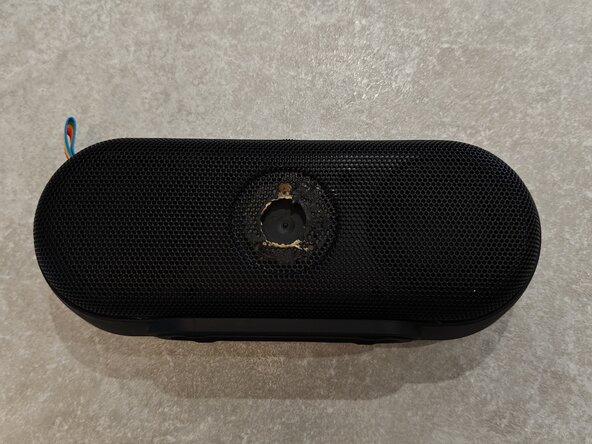
Using a metal spudger remove the small circular plastic plate on the back mesh. This is glued to both the mesh and the interior plastic, and will make it easier to remove the rear mesh
 Ask FixBot
-
-
-
Starting at the top. Place a Jimmy in the space between the main plastic/rubber body and the mesh back, and pry in an upwards motion
-
The bottom of the mesh can be a little stiff to remove as the manufacturer may have used more glue towards the base. Use the jimmy to pry around the edges of the mesh to loosen
-
Once the mesh is somewhat loosened, Starting at the top, peel the mesh off the main body of the device. You can use your fingers for this
-
-
-
Using a Phillips #0 Screwdriver, remove the 8 screws holding the front and back of the device together
-
-
-
You can pry the two halves apart with your hands when all the rear screws are removed
-
Black half with circuit board: Rear of device
-
White half with speakers: Front of device
-
Disconnect the Battery
-
Disconnect the Speakers
-
Remove a further 5 Philips screws
-
-
-
-
You can remove the board by lifting it from the bottom of the device
-
To make it easier, slide the board slightly to the left. This should free the USB-C port and headphone jack from their spot
-
The Volume wheel and top buttons will catch a little when removing the board, but they are sturdy and will not break with reasonable force
-
-
-
The Battery is surrounded in a sticky padded foam and securely attached to the rear of the device (Not shown in photos as I had already removed this prior to writing this guide)
-
I used some 99% Isopropyl to soften the adhesive and a metal spudger to carefully pry the battery from the rear casing
-
-




To reassemble your device, follow these instructions in reverse order.

