
Disassembling Nintendo DSi Bottom case

rjcamero and 15 other contributors
Last updated on Aug 2, 2024
Views: 7.5K
View statistics:
- Past 24 Hours:
- 3
- Past 7 Days:
- 36
- Past 30 Days:
- 150
- All Time:
- 7,532
Comments: 1
1 comment on steps.
Completed: 1 2
1 person has marked this guide "completed." Will you be next?
2 people have marked this guide "completed." Including you — great job!
Favorites: 5 6
5 people have favorited (and subscribed to) this guide. Will you be next?
6 people have favorited (and subscribed to) this guide — including you!
In Progress
This guide is a work in progress. Reload periodically to see the latest changes!
Incorrect Tools
Help make this guide better by using the correct tools in images and/or text.
Missing Steps
Oops! This guide is currently missing one or more important steps.
Introduction
Go to step 1 ↓This guide has been updated by iFixit staff! Read the new, official guide here.
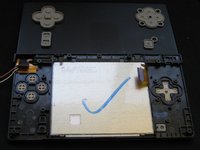
A guide on how to disassemble the bottom case assembly, including removing the LCD and buttons.
What you need


-
-
Step 1 Battery
Careful: steps 1-2 are sourced from a guide that's marked as in-progress.
-
Loosen the two screws on the battery panel. Then lift the panel up to remove it.
 Ask FixBot
-
-
-
L Button.
-
Top of the battery pack.
-
To remove the battery pack, place your fingernail or a spudger at the top of the battery near the L button. Gently lift the battery out.
-
-
-
-
Step 3 Motherboard
Careful: steps 3-4 are sourced from a guide that's marked as in-progress.
-
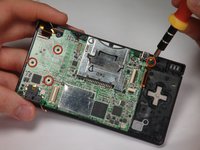
Remove 4 Phillips screws from the board.
-
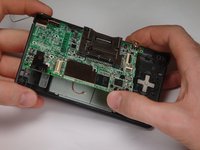
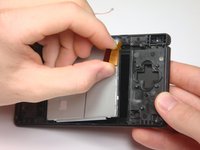
Lift the main board from the bottom end and flip it over to reveal the last connector.
-
-
-
Disconnect the ribbon cable by gently using a plastic opening tool to flip up the black connector latch. The cable should easily slide out from the connector.
-
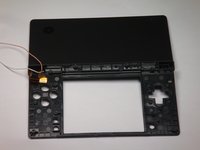
The motherboard should now be free from the rest of the device.
-
-
-
-
-
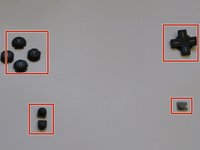
A/B/X/Y button assembly
-
Select/Start button assembly
-
D-pad
-
Power button
-
-
-






To reassemble your device, follow these instructions in reverse order.
Cancel: I did not complete this guide.
One other person completed this guide.

Team

Cal Poly, Team 6-1, Maness Fall 2009 Member of Cal Poly, Team 6-1, Maness Fall 2009
CPSU-MANESS-F09S6G1
5 Members
48 Guides authored
