
Disassembling Motorola Cliq Rear Casing

Tony Tran and
Last updated on Jan 26, 2024
Views: 1.2K
View statistics:
- Past 24 Hours:
- 3
- Past 7 Days:
- 22
- Past 30 Days:
- 96
- All Time:
- 1,222
Comments: 0
No one has left comments on this guide. Will you be first?
Go to guide commentsCompleted: 3 4
3 people have marked this guide "completed." Will you be next?
4 people have marked this guide "completed." Including you — great job!
Favorites: 1 2
1 person has favorited (and subscribed to) this guide. Will you be next?
2 people have favorited (and subscribed to) this guide — including you!
Featured Student Guide
This guide has been the hard work of our awesome students and is found to be exceptionally cool by the iFixit staff.
Better Introduction
Improve this guide by completing or revising its introduction.
What you need
Tools
-
Spudger4.9


Introduction
Go to step 1 ↓This is ONLY a prerequisite guide to remove the rear casing in the Motorola Cliq.
-
-
-
Turning over your phone, place two fingers on the back cover and apply pressure away from the camera to slide the back cover off.
 Ask FixBot
-
-
-
Pinch the battery pull tab located below the camera, pull it upwards, and remove the battery.
-
-
-
-
-
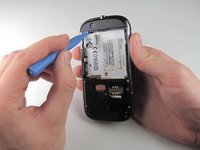
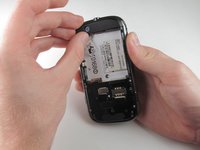
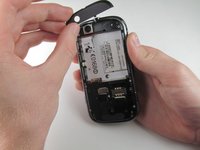
Wedge a plastic opening tool behind the panel covering the camera, pry it up, and remove it using your fingers.
-
-
-
-
Remove the six 4.0 mm T4 Torx screws which line the edge of the back of the phone.
-
-
-
Turn the phone over and slide out the keyboard.
-
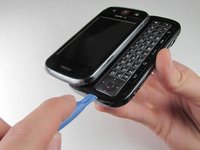
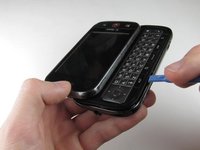
Wedge a plastic opening tool where the keyboard meets the back casing of the phone next to the headphone jack.
-
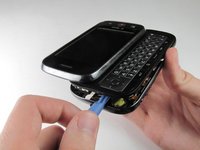
Carefully pry open the back casing along the keyboard's edge until at least two corners of the back casing are separated from the keyboard.
-
-
-
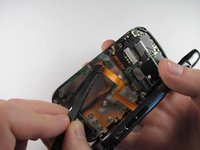
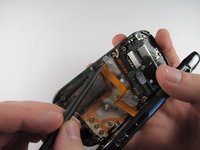
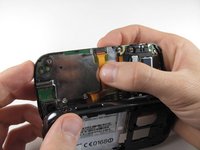
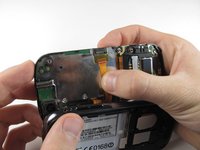
Press your thumb against the orange power cable and pull it down slowly to disconnect the power cable from the bottom of the keyboard.
-
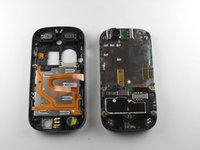
The rear casing and the rest of the phone should now be completely separated.
-
-








To reassemble your device, follow these instructions in reverse order.
Cancel: I did not complete this guide.
3 other people completed this guide.

Team

Cal Poly, Team 10-42, Amido Spring 2013 Member of Cal Poly, Team 10-42, Amido Spring 2013
CPSU-AMIDO-S13S10G42
4 Members
96 Guides authored
