
Disassembling General Electric Telephone 2-9710A Base Shell

Alles Rebel and 10 other contributors
Last updated on Jul 7, 2025
Views: 1.3K
View statistics:
- Past 24 Hours:
- 1
- Past 7 Days:
- 14
- Past 30 Days:
- 90
- All Time:
- 1,329
Comments: 0
No one has left comments on this guide. Will you be first?
Go to guide commentsCompleted: 0 1
No one has marked this guide "completed." Will you be the first?
1 person has marked this guide "completed." It's you — great job!
Favorites: 0 1
No one has favorited (and subscribed to) this guide. Will you be the first?
1 person has favorited (and subscribed to) this guide — and that's you!
Introduction
Go to step 1 ↓This guide gives step-by-step instructions for removing the outer shell of the base to assess the logic board within the phone. After completing this guide, you will have access to the logic board and all other interior parts of the telephone.
What you need
Tools


-
-
-
Using a plastic opening tool, remove the phone cord from the phone jack at the base of the headset.
 Ask FixBot
-
-
-
Remove the 7.5 mm screw.
-
Remove the screw cap.
-
Pull up the phone cord to remove it from the base.
-
-
-
-
-
Start by flipping over the device and locating the battery compartment door.
-
Remove the battery compartment door by applying thumb pressure to the area indicated on the battery door.
-
Remove the battery from the phone.
-
Start by inserting your new 9-volt battery in the correct orientation.
-
Once you have inserted your new 9-volt battery, turn over your device and start dialing in phone numbers or playing the radio to make sure everything works.
-
If your device does not turn on, it is likely that the battery isn't seated in the proper way.
-
-
-
-
-
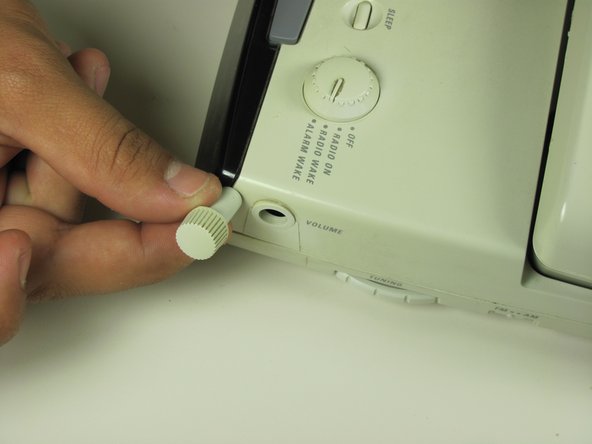
Locate the volume dial on the right side of the telephone.
-
Remove the volume dial by gently grasping it and pulling it away from the base.
-
-
-
-
Remove the three 12 mm screws with a Phillips #1 screwdriver.
-
Remove the three 18 mm screws with a Phillips #1 screwdriver.
-
-
-
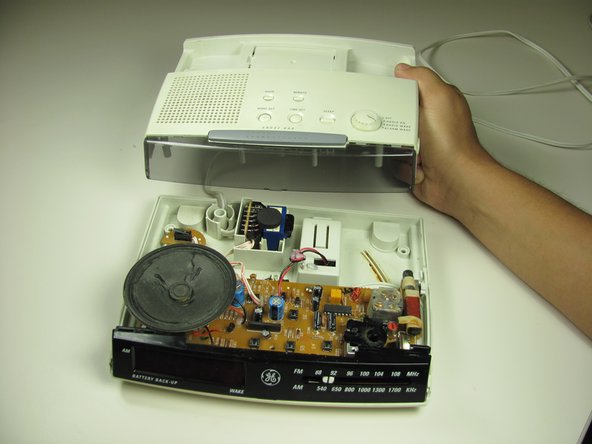
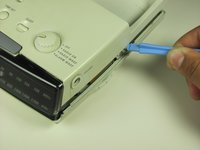
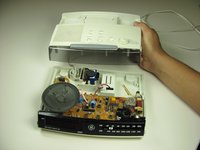
Pry off the base shell using a plastic opener tool.
-
Set the shell aside.
-
-




Reassemble your devise by following these instructions in reverse order.

Team

Cal Poly, Team 16-59, Forte Fall 2012 Member of Cal Poly, Team 16-59, Forte Fall 2012
CPSU-FORTE-F12S16G59
4 Members
96 Guides authored
