Free Shipping on Domestic Orders $75+

Disassembling BlackBerry 8820 Outer Casing

What you need

  1. Disassembling BlackBerry 8820 Outer Casing, Outer Casing: step 1, image 1 of 1
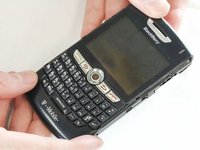
    • Remove the battery cover by applying pressure and sliding the silver square on the back of the phone downwards.

    Ask FixBot

    Add Comment

  2. Disassembling BlackBerry 8820 Outer Casing: step 2, image 1 of 2 Disassembling BlackBerry 8820 Outer Casing: step 2, image 2 of 2
    • Remove the battery by prying under it with your finger or a plastic opening tool.

    • Remove the four small 3/8" long screws using a 1/16" diameter torx screwdriver.

    Ask FixBot

    Add Comment

  3. Disassembling BlackBerry 8820 Outer Casing: step 3, image 1 of 2 Disassembling BlackBerry 8820 Outer Casing: step 3, image 2 of 2
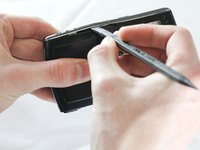
    • Carefully remove the two plastic side bars using a nylon spudger.

    Ask FixBot

    Add Comment

  4. Disassembling BlackBerry 8820 Outer Casing: step 4, image 1 of 1
    • Carefully pry the back casing off with a nylon spudger.

    • There are two small clamps on each edge that need to be unhooked before the casing can come off.

    Ask FixBot

    Add Comment

  5. Disassembling BlackBerry 8820 Outer Casing: step 5, image 1 of 1
    • Pry off the front casing.

    • Be cautious of sensors and other sensitive areas of the newly exposed electronics.

    Ask FixBot

    Add Comment

Conclusion

To reassemble your device, follow these instructions in reverse order.

Cancel: I did not complete this guide.

One other person completed this guide.

ryan

Member since: 04/12/13

44 Reputation

5 Guides authored

Team

Cal Poly, Team 13-64, Johann Spring 2013 Member of Cal Poly, Team 13-64, Johann Spring 2013

CPSU-JOHANN-S13S13G64

4 Members

13 Guides authored

0 Guide Comments

Add Comment

View Statistics:

Past 24 Hours: 1

Past 7 Days: 4

Past 30 Days: 41

All Time: 1,228