
Disassembling 8BitDo Ultimate Wireless Case

Last updated on Jun 1, 2026
Views: 602
View statistics:
- Past 24 Hours:
- 8
- Past 7 Days:
- 51
- Past 30 Days:
- 202
- All Time:
- 602
Comments: 0
No one has left comments on this guide. Will you be first?
Go to guide commentsCompleted: 0 1
No one has marked this guide "completed." Will you be the first?
1 person has marked this guide "completed." It's you — great job!
Favorites: 0 1
No one has favorited (and subscribed to) this guide. Will you be the first?
1 person has favorited (and subscribed to) this guide — and that's you!
Introduction
Go to step 1 ↓Use this guide to open your 8BitDo Ultimate Wireless case.
What you need
Tools


-
-
-
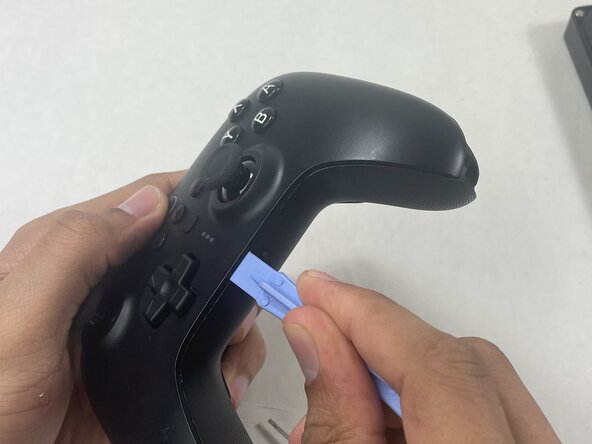
Insert an opening pick into the seam between the left controller grip and main controller body.
-
Pry the grip off.
-
Repeat for the right grip.
 Ask FixBot
-
-
-
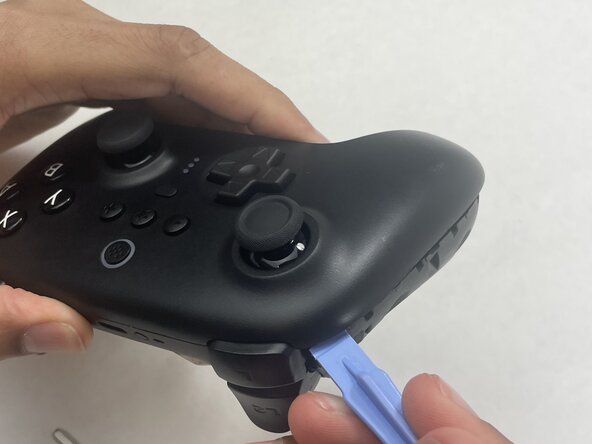
Insert an opening tool into seam at the bottom of the device and carefully pry the front and back shells apart.
-
Set the halves next to each other with care not to strain the connected ribbon cables.
-
-
-
-
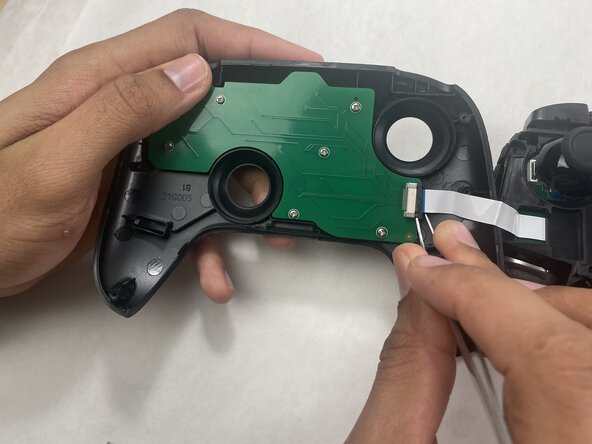
The ribbon cable is secured with a locking tab connector.
-
Use tweezers to unlock the locking tab on the ribbon cable connector, then gently disconnect the ribbon cable.
-
-






To reassemble your device, follow these instructions in reverse order.

