Introduction
We are going to teach you how to remove the external cover on the Digital2 Platinum Pad 9 tablet. Getting the cover off is a little tricky and takes a bit of force.
What you need
-
-
-
Take the plastic opening tool and insert it into the crease between the screen and the plastic casing and press down.
 Ask FixBot
-
-
-
-
After inserting the plastic opening tool, run it around the device a few times to loosen the external cover.
-
-
-
Once you've gone around a few times a corner will pop up, insert the opening tool there and repeat step 2 with slightly more pressure. Do this until every section of the backing has popped up.
-
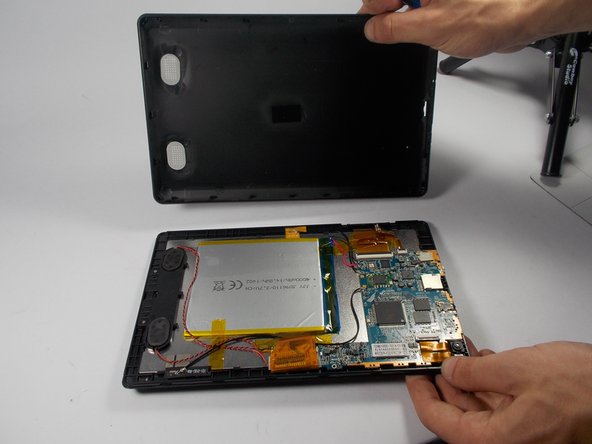
Then just remove the backing.
-
-


To reassemble your device, follow these instructions in reverse order.

Team

UMass Dartmouth, Team 5-6, Landers Spring 2016 Member of UMass Dartmouth, Team 5-6, Landers Spring 2016
UMASSD-LANDERS-S16S5G6
3 Members
72 Guides authored
