Free Shipping on Domestic Orders $75+

Dexcom G6 Receiver Motherboard Replacement

Views: 1.5K

View statistics:

Past 24 Hours:
1
Past 7 Days:
19
Past 30 Days:
58
All Time:
1,456
Comments: 7

5 comments on steps, 2 guide comments.

Go to guide comments
Completed: 0

No one has marked this guide "completed." Will you be the first?

Favorites: 0

No one has favorited (and subscribed to) this guide. Will you be the first?

Time Required: No estimate
Difficulty: Moderate
Community-Contributed Guide

An awesome member of our community made this guide. It was not created by iFixit staff.

Dexcom G6 Receiver Motherboard Replacement

What you need

Tools

    1. Dexcom G6 Receiver Motherboard Replacement, Display and Front Bezel: step 1, image 1 of 1
      • Unscrew the 6 Torx T5 screws from the back of the device

      Ask FixBot

      Add Comment

    2. Dexcom G6 Receiver Motherboard Replacement: step 2, image 1 of 2 Dexcom G6 Receiver Motherboard Replacement: step 2, image 2 of 2
      • Use a spudger to lift up the screen assembly ribbon cable flap, then remove the ribbon cable.

      • Screen Information: Model AM0310R-04 Lot # NHT18080052

      Ask FixBot

      Add Comment

    1. Dexcom G6 Receiver Motherboard Replacement, Charging Port: step 3, image 1 of 1
      • Using a spudger, unplug the Charging Port connector from the motherboard.

      Ask FixBot

      Add Comment

    2. Dexcom G6 Receiver Motherboard Replacement: step 4, image 1 of 1
      • Remove the 2 silver Torx T5 screws holding the charging port down.

      Ask FixBot

      Add Comment

    3. Dexcom G6 Receiver Motherboard Replacement: step 5, image 1 of 1
      • Remove the Charging Port Assembly from the motherboard.

      Ask FixBot

      Add Comment

    1. Dexcom G6 Receiver Motherboard Replacement, Motherboard: step 6, image 1 of 1
      • Remove the silver Torx T5 screw holding the motherboard down.

      Ask FixBot

      Add Comment

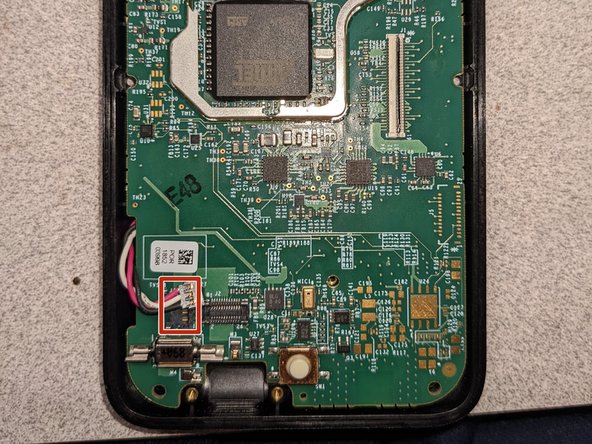
    2. Dexcom G6 Receiver Motherboard Replacement: step 7, image 1 of 2 Dexcom G6 Receiver Motherboard Replacement: step 7, image 2 of 2
      • Using a spudger, carefully remove the battery connector on the left side of the motherboard.

      Ask FixBot

      Add Comment

    3. Dexcom G6 Receiver Motherboard Replacement: step 8, image 1 of 1
      • Using a spudger, carefully pry up the motherboard to remove it.

      Ask FixBot

      Add Comment

Conclusion

To reassemble your device, follow these instructions in reverse order.

Cancel: I did not complete this guide.

Andrew S

Member since: 07/30/21

15,633 Reputation

8 Guides authored

2 Guide Comments

do you know of anyone that can fix these items

Rick MacDonald - Reply Share

anyone out there fix these items

Rick MacDonald - Reply Share

Add Comment

View Statistics:

Past 24 Hours: 1

Past 7 Days: 19

Past 30 Days: 58

All Time: 1,456