Free Shipping on Domestic Orders $75+

Dell XPS M1730 RAM Replacement

What you need

    1. Dell XPS M1730 RAM Replacement, Battery: step 1, image 1 of 1
      • Push the sliding button near the battery compartment.

      Ask FixBot

      Add Comment

    2. Dell XPS M1730 RAM Replacement: step 2, image 1 of 1
      • Slide the button next to the battery and lift up on the lip of the battery edge.

      Ask FixBot

      Add Comment

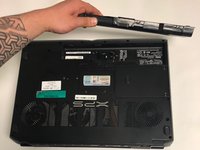
    3. Dell XPS M1730 RAM Replacement: step 3, image 1 of 2 Dell XPS M1730 RAM Replacement: step 3, image 2 of 2
      • Lift and remove the battery.

      Ask FixBot

      Add Comment

    1. Dell XPS M1730 RAM Replacement, RAM: step 4, image 1 of 1
      • Remove the two M2x3mm screws from the center panel on the back of computer with a Phillips #0 screwdriver head.

      Ask FixBot

      Add Comment

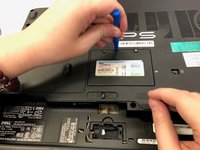
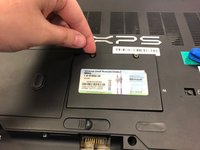
    2. Dell XPS M1730 RAM Replacement: step 5, image 1 of 3 Dell XPS M1730 RAM Replacement: step 5, image 2 of 3 Dell XPS M1730 RAM Replacement: step 5, image 3 of 3
      • Use a plastic opening tool to pull up and remove the center panel.

      Ask FixBot

      Add Comment

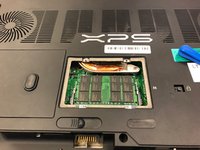
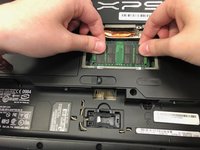
    3. Dell XPS M1730 RAM Replacement: step 6, image 1 of 1
      • Pull the two clips on either side of the memory sticks.

      Ask FixBot

      Add Comment

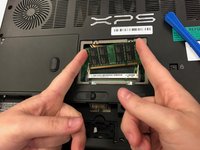
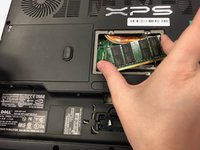
    4. Dell XPS M1730 RAM Replacement: step 7, image 1 of 3 Dell XPS M1730 RAM Replacement: step 7, image 2 of 3 Dell XPS M1730 RAM Replacement: step 7, image 3 of 3
      • Slide the memory sticks out of their clips.

      Ask FixBot

      Add Comment

Conclusion

To reassemble your device, follow these instructions in reverse order.

Cancel: I did not complete this guide.

2 other people completed this guide.

0 Guide Comments

Add Comment

View Statistics:

Past 24 Hours: 0

Past 7 Days: 8

Past 30 Days: 34

All Time: 824