
Dell XPS M1530 Thermal Compound Replacement

Tyler Scholz and 4 other contributors
Last updated on Dec 6, 2022
Views: 2.9K
View statistics:
- Past 24 Hours:
- 4
- Past 7 Days:
- 27
- Past 30 Days:
- 102
- All Time:
- 2,910
Comments: 0
No one has left comments on this guide. Will you be first?
Go to guide commentsCompleted: 2 3
2 people have marked this guide "completed." Will you be next?
3 people have marked this guide "completed." Including you — great job!
Favorites: 2 3
2 people have favorited (and subscribed to) this guide. Will you be next?
3 people have favorited (and subscribed to) this guide — including you!
Introduction
Go to step 1 ↓First, this should be a last resort for if your computer is overheating and you have ruled out the other two options from the troubleshooting page. This guide is to help you find the thermal paste on your GPU and CPU for when the heat sink is removed.
What you need
Fix Kit
This kit contains all the parts and tools needed to complete this guide.

Parts


Tools
-
-
-
-
Spudger4.9


-
-
-
-
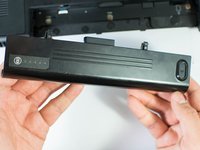
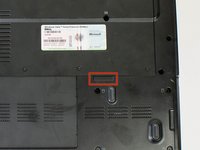
Unscrew the four Phillips #1 screws holding down the back panel. Then remove one 5.8mm Phillips #1 screw labeled "M" in the middle of the back panel.
-
Four 3.9mm Phillips #1 screws
-
One 5.8mm Phillips #1 screw
-
-
-
-
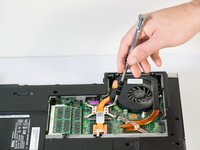
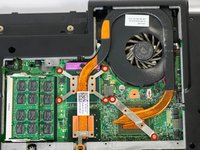
First, unscrew the six screws that are holding down the fan and heat sink with a Philips #1 screwdriver. Then use a Phillips #1 to remove the single screw near the bottom of the heat sink.
-
Six Silver Chrome 5.8mm Phillips #1 screws
-
One 5.8mm Phillips #1 screw
-
-
-
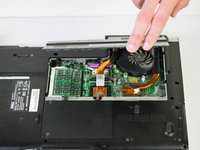
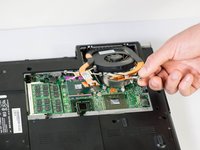
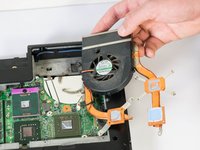
Use your fingers or a spudger to remove the power pin connecting the fan to the laptop by pulling it straight up off the motherboard.
-
-
-
-
-
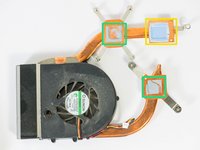
Clean the CPU, GPU and heat sink with 90% isopropyl alcohol dabbed onto a paper towel.
-
CPU Compound
-
GPU Compound
-
Thermal Pad
-
Heat sink compound
-
-

 Ask FixBot












To reassemble your device, follow these instructions in reverse order.
Cancel: I did not complete this guide.
2 other people completed this guide.

Team

Cal Poly, Team 18-4, Maness Winter 2015 Member of Cal Poly, Team 18-4, Maness Winter 2015
CPSU-MANESS-W15S18G4
4 Members
96 Guides authored
