Free Shipping on Domestic Orders $75+

Dell XPS M1330 Hard Drive Replacement

What you need

  1. Dell XPS M1330 Hard Drive Replacement, Battery: step 1, image 1 of 1
    • Flip the laptop on its back, so that the underside is facing up.

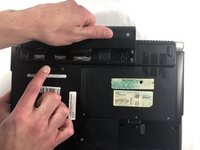
  2. Dell XPS M1330 Hard Drive Replacement: step 2, image 1 of 1
    • Push and hold the slide button to the left and unlock the mechanism.

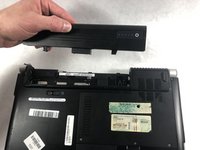
  3. Dell XPS M1330 Hard Drive Replacement: step 3, image 1 of 2 Dell XPS M1330 Hard Drive Replacement: step 3, image 2 of 2
    • Lift the computer up and slowly pull the battery straight out from the device.

  4. Dell XPS M1330 Hard Drive Replacement, Hard Drive: step 4, image 1 of 1
    • Flip the laptop on its back, so that the underside is facing up

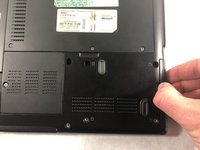
  5. Dell XPS M1330 Hard Drive Replacement: step 5, image 1 of 1
    • Remove the four 3.0mm Phillips #1 screws securing the hard drive casing.

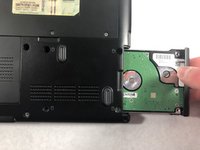
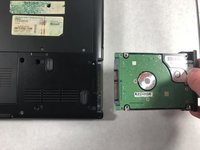
  6. Dell XPS M1330 Hard Drive Replacement: step 6, image 1 of 3 Dell XPS M1330 Hard Drive Replacement: step 6, image 2 of 3 Dell XPS M1330 Hard Drive Replacement: step 6, image 3 of 3
    • Slide the hard drive away from the computer, slowly and carefully.

Conclusion

To reassemble your device, follow these instructions in reverse order.

3 other people completed this guide.

Kai Kapossy

Member since: 03/24/19

739 Reputation

5 Guides authored

Team

0 Guide Comments

Add Comment

View Statistics:

Past 24 Hours: 1

Past 7 Days: 14

Past 30 Days: 58

All Time: 1,334