Free Shipping on Domestic Orders $75+

Dell XPS 9720 Fan Replacement

What you need

  1. Dell XPS 9720 Fan Replacement, Remove back cover: step 1, image 1 of 1
    • Unscrew 8 T5 screws. Use an opening tool to pop open the plastic tabs holding the aluminum and carbon fiber shells together.

  2. Dell XPS 9720 Fan Replacement, Disconnect battery: step 2, image 1 of 2 Dell XPS 9720 Fan Replacement, Disconnect battery: step 2, image 2 of 2
    • Insert finger into plastic loop and pull firmly away from motherboard.

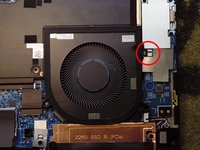
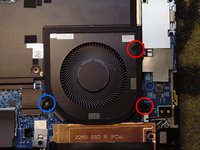
  3. Dell XPS 9720 Fan Replacement, Remove fan: step 3, image 1 of 2 Dell XPS 9720 Fan Replacement, Remove fan: step 3, image 2 of 2
    • Gently unplug the fan connector.

    • Remove the two PH1 (red) and single PH00 (blue) screws.

    • The fan may now be lifted from the chassis. Reverse these steps to install the new fan.

Conclusion

To reassemble your device, follow these instructions in reverse order.

Sebastien Bolle

Member since: 09/12/15

350 Reputation

3 Guides authored

0 Guide Comments

Add Comment

View Statistics:

Past 24 Hours: 2

Past 7 Days: 4

Past 30 Days: 17

All Time: 655