
Dell XPS 15-L502X Keyboard Replacement

Vishal and 2 other contributors
Last updated on Sep 10, 2020
Views: 6.7K
View statistics:
- Past 24 Hours:
- 2
- Past 7 Days:
- 24
- Past 30 Days:
- 103
- All Time:
- 6,698
Comments: 5
4 comments on steps, 1 guide comment.
Go to guide commentsCompleted: 3 4
3 people have marked this guide "completed." Will you be next?
4 people have marked this guide "completed." Including you — great job!
Favorites: 0 1
No one has favorited (and subscribed to) this guide. Will you be the first?
1 person has favorited (and subscribed to) this guide — and that's you!
Action Shots
Be an action hero! This guide needs images that better demonstrate how to perform specific actions.
Introduction
Go to step 1 ↓This guide will allow you to replace the keyboard completely. You may need to remove this in order to replace the screen.
What you need
Tools
-
Spudger4.9

-
-
-
Pry up the top of the cover first by using a spudger to wedge in between the cover and base of the computer.
-
Once the spudger is between the cover and the base of the computer, wedge underneath the remaining border surrounding the keyboard.
 Ask FixBot
-
-
-
Work your fingers underneath the cover. Then, delicately pull the cover off of the computer.
-
-
-
-
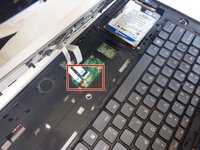
Unhook the cables connected to the mouse pad by flipping up the black tabs that hold either cable in place.
-
-
-
-
-
Use a spudger to release both clips that hold the keyboard in place.
-
-
-
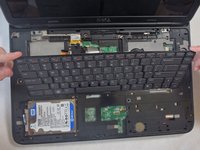
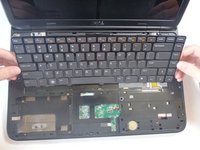
Slowly lift the top of the keyboard and then pull the keyboard towards the screen.
-
-
-
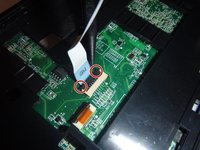
Using a spudger, slowly open up the two black clips holding down both cables.
-
Separate the unfastened cables from the base of the computer.
-
Once the cables are detached from the keyboard, you may pull the keyboard away completely and set it aside.
-
-





To reassemble your device, follow these instructions in reverse order.
Cancel: I did not complete this guide.
3 other people completed this guide.

Team

IUPUI, Team 2-3, Baechle Fall 2015 Member of IUPUI, Team 2-3, Baechle Fall 2015
IUPUI-BAECHLE-F15S2G3
3 Members
84 Guides authored
