Introduction
Use this guide to learn the steps to remove the base cover of your Dell XPS 15 9570. The base cover must be removed to see inside the device.
Prior to starting this guide, be sure the laptop is powered off and it is unplugged from the charging cord.
What you need
-
-
-
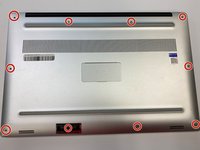
Flip the device over so the base cover of the computer is facing upwards.
 Ask FixBot
-
-
-
-
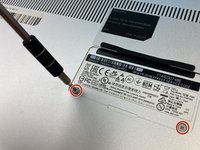
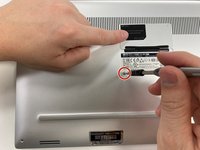
Flip open the system badge and with a Phillips #00 screwdriver, remove the two 8.5 mm screws.
-
-





To reassemble your device, follow these instructions in reverse order.
Cancel: I did not complete this guide.
2 other people completed this guide.

Team

University of Alabama, Team 2-4, Bedsole Fall 2021 Member of University of Alabama, Team 2-4, Bedsole Fall 2021
UA-BEDSOLE-F21S2G4
3 Members
72 Guides authored
