Introduction
Replacing the battery of a Dell XPS 15 9510 laptop is a straightforward task requiring only a few tools. The new battery constitutes nearly all of the cost of this repair, so if you are planning to order a replacement battery for this or any other laptop, it may be wise to remove the back panel of the laptop to ensure that the one you are ordering matches the existing one.
If the battery you are replacing is swollen, be sure to take appropriate precautions.
What you need
-
-
-
Remove eight 3 mm screws from the underside of the case using a T5 Torx screwdriver.
 Ask FixBot
-
-
-
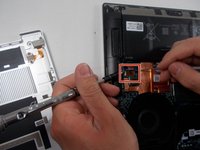
Wedge the case apart with a nylon spudger.
-
Slide spudger along each side of the laptop
-
-
-
-
-
-
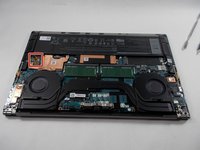
Using the small battery pull tab, disconnect the battery connector from the motherboard.
-
-
-
Remove eight 2.5 mm from around the perimeter of the battery using a Phillips #0 screwdriver.
-
-




To reassemble your device, follow these instructions in reverse order.
Cancel: I did not complete this guide.
14 other people completed this guide.

Team

UMass Dartmouth, Team 1-3, Mellen Spring 2022 Member of UMass Dartmouth, Team 1-3, Mellen Spring 2022
UMASSD-MELLEN-S22S1G3
3 Members
54 Guides authored
5 Guide Comments
XPS 15 9510 states the battery (purchased from ifixit) is FAKE and the battery will not charge.
can somebody verify this? I want to purchase replacement battery (want it to work.. )
@tommypickles IT Administrator here. I would strongly recommend purchasing the battery directly from DELL — don’t risk playing the battery lottery on a 3rd party vendor. The battery is NOT where you want to skimp on money.
Works perfectly good for me
should be noted that you will need to transfer the battery connection cable from the old to the new battery.
Those steps should also be added to the instructions
