Introduction
As one of the key features of a laptop, the mouse pad is one of the elements of the device that is most likely to suffer wear over time. The right/left click buttons are especially susceptible to wear and tear, as these are mechanical systems connected to electrical boards.
If your left-click or right-click buttons aren't working, you may need to replace the board that controls those functions. Use this guide to learn how!
What you need
-
-
-
Flip the device over. Unscrew nine marked 7mm Phillips #1 screws.
 Ask FixBot
-
-
-
Remove the keyboard by pushing back the tabs at the marked locations with a spudger or plastic opening tool.
-
-
-
-
Turn the device around so the screen is closest to you. Lift the keyboard and detach the ribbon cable with the spudger.
-
-
-
Remove the keyboard and set it aside. Detach the other ribbon cables with the spudger.
-
Remove five 8mm Phillips #1 screws.
-
-
-
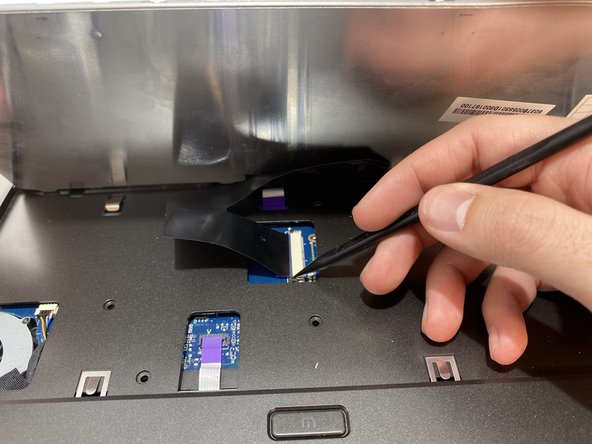
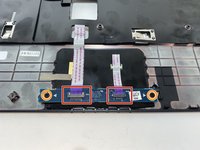
Under the trackpad, detach the ribbon cables with the spudger.
-
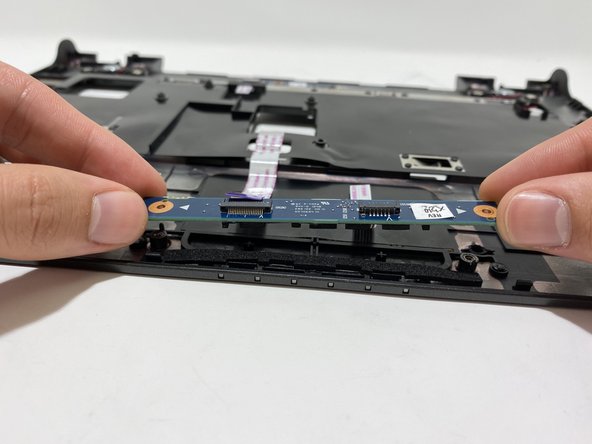
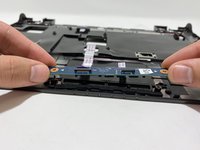
Unscrew two 3mm Phillips #1 screws and lift the board from the pegs.
-
Remove the board from the laptop.
-
-




To reassemble your device, follow these instructions in reverse order.
Cancel: I did not complete this guide.
One other person completed this guide.

Team

University of Memphis, Team S2-G1, Kim Fall 2019 Member of University of Memphis, Team S2-G1, Kim Fall 2019
UM-KIM-F19S2G1
4 Members
36 Guides authored
