Introduction
Compared to desktop devices, laptops require a transportable/external source of power. Unfortunately, especially with older devices, these external sources (batteries) were not designed to last long periods of time, and they will eventually wear off after going through multiple recharging cycles until they are incapable of holding a charge.
Follow this tutorial to replace the battery on the Dell Wyse Xn0m laptop computer.
What you need
-
-
-
-
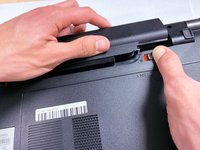
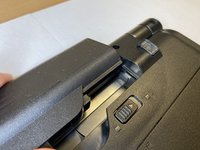
Slide the left battery release switch to the unlocked position (red showing). This is also indicated by the lock/unlock icons beside the switch.
-
-
-
To remove the battery, pull back the right spring-loaded battery release switch while simultaneously sliding the battery away from the laptop.
-

 Ask FixBot


To reassemble your device, follow these instructions in reverse order.
Cancel: I did not complete this guide.
4 other people completed this guide.

Team

University of Memphis, Team S2-G1, Kim Fall 2019 Member of University of Memphis, Team S2-G1, Kim Fall 2019
UM-KIM-F19S2G1
4 Members
36 Guides authored
