
Dell Vostro 5510 Battery Replacement

Abril Alejos and 3 other contributors
Last updated on Mar 26, 2026
Views: 1.6K
View statistics:
- Past 24 Hours:
- 4
- Past 7 Days:
- 38
- Past 30 Days:
- 169
- All Time:
- 1,643
Comments: 1
1 guide comment.
Go to guide commentsCompleted: 2 3
2 people have marked this guide "completed." Will you be next?
3 people have marked this guide "completed." Including you — great job!
Favorites: 0 1
No one has favorited (and subscribed to) this guide. Will you be the first?
1 person has favorited (and subscribed to) this guide — and that's you!
Featured Student Guide
This guide has been the hard work of our awesome students and is found to be exceptionally cool by the iFixit staff.
Introduction
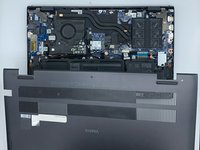
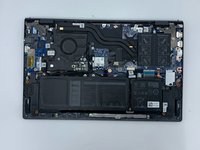
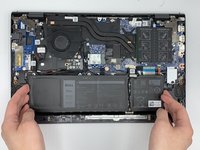
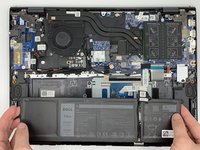
Go to step 1 ↓To gain any access to the internal components of the Dell Vostro 15 5510 the back cover will have to be removed. Once the back cover is removed, you can remove and replace the battery. In order to complete this guide, you will need a Phillips #0 screwdriver head and a plastic opening tool. Ensure to unscrew all screws to prevent any battery or battery input damage.
What you need


-
-
-
Remove the remaining (M2x4mm) screws with the screwdriver.
-
Loosen the two captive (M2x7.5mm) corner screws with the screwdriver.
-
-
-
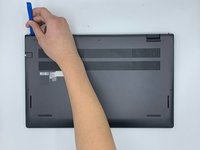
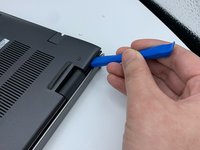
Pry open the top left corner of the cover with the opening tool.
-
Pry open the top right corner of the cover with the opening tool.
-
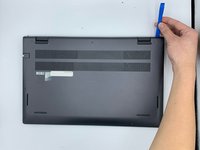
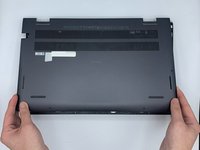
Pry the rest of the cover with the opening tool, working in a clockwise motion until it is completely loosened.
-
-
-
-
-
Unscrew the corner and top middle screws (M2x3mm) from the battery with the screwdriver.
-
-

 Ask FixBot






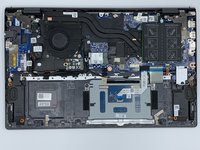
To reassemble your device, follow these instructions in reverse order.
Cancel: I did not complete this guide.
2 other people completed this guide.

Team

University of North Texas, Team 3-5, Saru Jimmy Spring 2023 Member of University of North Texas, Team 3-5, Saru Jimmy Spring 2023
UNT-SARU JIMMY-S23S3G5
4 Members
72 Guides authored
