Free Shipping on Domestic Orders $75+

Dell Vostro 1710 Heatsink Replacement

What you need

    1. Dell Vostro 1710 Heatsink Replacement, Battery: step 1, image 1 of 2 Dell Vostro 1710 Heatsink Replacement, Battery: step 1, image 2 of 2
      • Make certain that the power to your laptop is off.

      • Press and slide the two buttons outwards and away from the battery.

      Ask FixBot

      Add Comment

    2. Dell Vostro 1710 Heatsink Replacement: step 2, image 1 of 1
      • Slide the battery away and parallel from the laptop.

      Ask FixBot

      Add Comment

    3. Dell Vostro 1710 Heatsink Replacement: step 3, image 1 of 1
      • Remove the battery from the slot.

      Ask FixBot

      Add Comment

    1. Dell Vostro 1710 Heatsink Replacement, Back Panel: step 4, image 1 of 2 Dell Vostro 1710 Heatsink Replacement, Back Panel: step 4, image 2 of 2
      • Unscrew the eight 6mm screws with a Philips #1 screw driver.

      Ask FixBot

      Add Comment

    2. Dell Vostro 1710 Heatsink Replacement: step 5, image 1 of 1
      • Lift back cover from the groove on the left side of the cover next to the symbol.

      Ask FixBot

      Add Comment

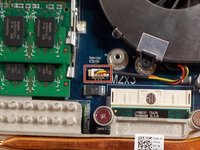
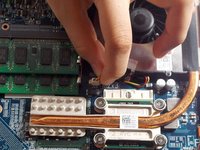
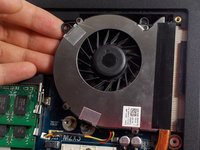
    1. Dell Vostro 1710 Heatsink Replacement, Fan: step 6, image 1 of 2 Dell Vostro 1710 Heatsink Replacement, Fan: step 6, image 2 of 2
      • Unclip the power supply by pulling the cable directly up and out of the socket.

      Ask FixBot

      Add Comment

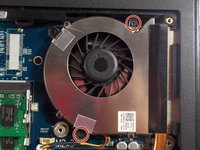
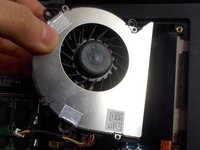
    2. Dell Vostro 1710 Heatsink Replacement: step 7, image 1 of 2 Dell Vostro 1710 Heatsink Replacement: step 7, image 2 of 2
      • Remove the two 3mm screws located around the edge of the fan with a Philips #1 screw driver.

      Ask FixBot

      Add Comment

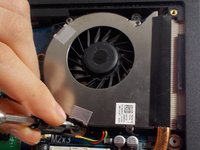
    3. Dell Vostro 1710 Heatsink Replacement: step 8, image 1 of 2 Dell Vostro 1710 Heatsink Replacement: step 8, image 2 of 2
      • Gently lift and pull to the left until the fan is free from the heatsink.

      Ask FixBot

      Add Comment

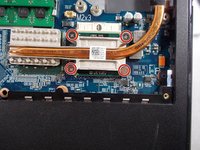
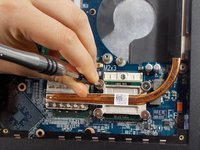
    1. Dell Vostro 1710 Heatsink Replacement, Heatsink: step 9, image 1 of 2 Dell Vostro 1710 Heatsink Replacement, Heatsink: step 9, image 2 of 2
      • Unscrew the four 8mm screws using a Phillips #1 screwdriver until the heatsink is free.

      • The screws do not come out, only loosen.

      Ask FixBot

      Add Comment

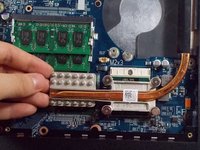
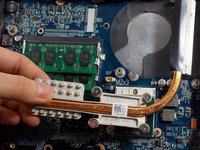
    2. Dell Vostro 1710 Heatsink Replacement: step 10, image 1 of 2 Dell Vostro 1710 Heatsink Replacement: step 10, image 2 of 2
      • Lift up on the heatsink to remove it from the laptop.

      Ask FixBot

      Add Comment

Conclusion

To reassemble your device, follow these instructions in reverse order.

Cancel: I did not complete this guide.

One other person completed this guide.

Tangxiao Sun

Member since: 03/19/18

496 Reputation

4 Guides authored

Team

0 Guide Comments

Add Comment

View Statistics:

Past 24 Hours: 2

Past 7 Days: 8

Past 30 Days: 34

All Time: 586