Free Shipping on Domestic Orders $75+

Dell Vostro 1400 RAM Replacement

What you need

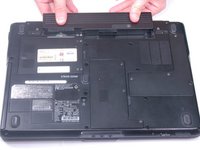
    1. Dell Vostro 1400 RAM Replacement, Battery: step 1, image 1 of 1
      • Be sure the power is off and all cables are unplugged from the device before starting.

      • After flipping over the laptop, the battery is on the bottom side of the laptop.

      • Find the tabs on both the left and right side of the battery.

      Ask FixBot

      Add Comment

    2. Dell Vostro 1400 RAM Replacement: step 2, image 1 of 1
      • Push tabs toward the outside of the laptop until they lock in place.

      Ask FixBot

      Add Comment

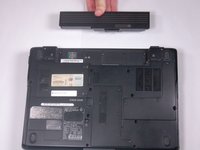
    3. Dell Vostro 1400 RAM Replacement: step 3, image 1 of 2 Dell Vostro 1400 RAM Replacement: step 3, image 2 of 2
      • Push the battery forward to eject it from the laptop.

      Ask FixBot

      Add Comment

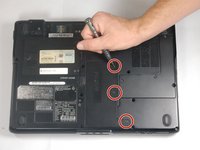
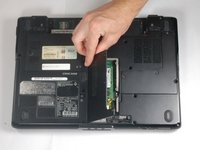
    1. Dell Vostro 1400 RAM Replacement, RAM: step 4, image 1 of 2 Dell Vostro 1400 RAM Replacement, RAM: step 4, image 2 of 2
      • Make sure the laptop is turned off and all cables are unplugged.

      • Loosen the three 3 mm screws on the RAM cover.

      • Screws will not completely come out.

      • Lift the cover and remove it from the laptop.

      Ask FixBot

      Add Comment

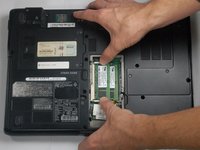
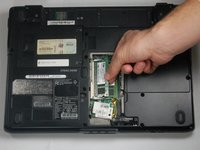
    2. Dell Vostro 1400 RAM Replacement: step 5, image 1 of 2 Dell Vostro 1400 RAM Replacement: step 5, image 2 of 2
      • Pull tabs apart on both the top and bottom of the memory card.

      • Lift memory card and remove it from the laptop.

      • Repeat the process for the second memory card.

      Ask FixBot

      Add Comment

Conclusion

To reassemble your device, follow these instructions in reverse order.

Cancel: I did not complete this guide.

One other person completed this guide.

David Hogg

Member since: 03/20/17

739 Reputation

5 Guides authored

Team

0 Guide Comments

Add Comment

View Statistics:

Past 24 Hours: 1

Past 7 Days: 5

Past 30 Days: 27

All Time: 703