Free Shipping on Domestic Orders $75+

Dell Vostro 1400 Hard Drive Replacement

What you need

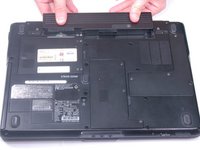
  1. Dell Vostro 1400 Hard Drive Replacement, Battery: step 1, image 1 of 1
    • Be sure the power is off and all cables are unplugged from the device before starting.

    • After flipping over the laptop, the battery is on the bottom side of the laptop.

    • Find the tabs on both the left and right side of the battery.

    Ask FixBot

    Add Comment

  2. Dell Vostro 1400 Hard Drive Replacement: step 2, image 1 of 1
    • Push tabs toward the outside of the laptop until they lock in place.

    Ask FixBot

    Add Comment

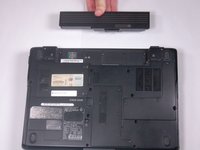
  3. Dell Vostro 1400 Hard Drive Replacement: step 3, image 1 of 2 Dell Vostro 1400 Hard Drive Replacement: step 3, image 2 of 2
    • Push the battery forward to eject it from the laptop.

    Ask FixBot

    Add Comment

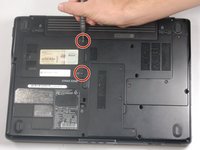
  4. Dell Vostro 1400 Hard Drive Replacement, Hard Drive: step 4, image 1 of 2 Dell Vostro 1400 Hard Drive Replacement, Hard Drive: step 4, image 2 of 2
    • Please ensure that your device is turned off and everything is unplugged before working on it.

    • Unscrew both screws on the hard drive panel until the panel is able to be removed.

    • The screws will not come off of the panel.

    • Once screws have been loosened, remove the panel from the laptop.

    Ask FixBot

    Add Comment

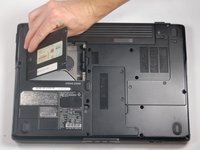
  5. Dell Vostro 1400 Hard Drive Replacement: step 5, image 1 of 1
    • Remove the hard drive by pulling up on the black tab on the right side of the hard drive.

    Ask FixBot

    Add Comment

Conclusion

To reassemble your device, follow these instructions in reverse order.

Cancel: I did not complete this guide.

2 other people completed this guide.

David Hogg

Member since: 03/20/17

739 Reputation

5 Guides authored

Team

0 Guide Comments

Add Comment

View Statistics:

Past 24 Hours: 1

Past 7 Days: 4

Past 30 Days: 38

All Time: 971