What you need
-
-
-
Slide the lock key to unlock the battery. Then you can lift the battery from its holder.
 Ask FixBot
-
-
-
-
-
Using Phillips screwdriver, remove 2 screws holding case.
-
Slide case towards back of laptop then lift off to remove.
-
-
-
-
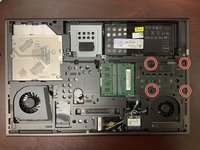
Using a Phillips Screwdriver, remove the 4 screws that hold the hard drive in place.
-
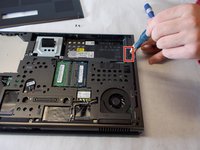
Using a Phillips #00 take out the 1.5mm screw then slide to unlock the SSD holder.
-
-
-
When the lock was slid, a medal holder popped out and that is where the SSD is hidden.
-
-



To reassemble your device, follow these instructions in reverse order.
Cancel: I did not complete this guide.
4 other people completed this guide.

Team

UMass Dartmouth, Team S8-G3, Valliere Spring 2018 Member of UMass Dartmouth, Team S8-G3, Valliere Spring 2018
UMASSD-VALLIERE-S18S8G3
2 Members
48 Guides authored
1 Guide Comment
How do you remove the bottom? Instructions only show removal of battery then next step shows full access to bottom of laptop? My slide switch doesn’t release the door, any thoughts?
