Introduction
Use this guide to replace a faulty optical drive in your Dell Precision M4700.
The optical drive is a piece of hardware that uses laser technology to allow your computer to read, edit, and/or delete information from discs such as DVDs and CDs. A failing optical drive will remove the ability from your computer to read the discs.
Before using this guide, be sure to review the Dell Precision M4700 Troubleshooting Often times, checking for debris in the drive will fix the issue.
What you need
-
-
-
Slide the release latch to unlock the battery.
-
Flip and remove the battery from the computer.
 Ask FixBot
-
-
-
-
Remove the two 3mm screws that secure the base cover to the computer with a Phillips #00 screwdriver.
-
Press the rubber tabs towards the rear of the computer to disengage the base cover.
-
Flip and remove the base cover from the computer.
-
-
-
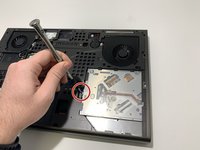
Remove the 3mm screw that secures the optical drive to the computer with a Phillips #00 screwdriver.
-
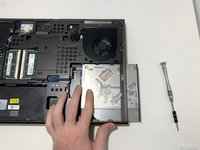
Slide the optical drive out.
-
-


To reassemble your device, follow these instructions in reverse order.
Cancel: I did not complete this guide.
One other person completed this guide.

Team

University of Memphis, Team S4-G5, Kim Fall 2019 Member of University of Memphis, Team S4-G5, Kim Fall 2019
UM-KIM-F19S4G5
4 Members
36 Guides authored
