Free Shipping on Domestic Orders $75+

Dell Precision M4400 Hard Drive Replacement

What you need

    1. Dell Precision M4400 Hard Drive Replacement, Battery: step 1, image 1 of 1
      • Slide the battery release latches to the open position. (The latches lock into place).

      • Grip the battery and slide it out of the battery bay.

      Ask FixBot

      Add Comment

    1. Dell Precision M4400 Hard Drive Replacement, Base Cover: step 2, image 1 of 1
      • Loosen the M2.5 x 5-mm captive screw.

      • Using the rubber feet for leverage, slide the bottom of the base assembly toward the front of the computer 1/8th inch, then lift to remove it.

      Ask FixBot

      Add Comment

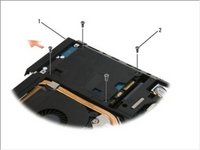
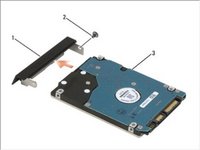
    1. Dell Precision M4400 Hard Drive Replacement, Hard Drive: step 3, image 1 of 2 Dell Precision M4400 Hard Drive Replacement, Hard Drive: step 3, image 2 of 2
      • NOTICE: When the hard drive is not in the computer, store it in protective anti-static packaging.

      • Remove the four M3 x 3-mm screws securing the hard drive. These screws are on the bottom of the base cover.

      • NOTE: If the bottom of the base cover is detached from the laptop, the four screws securing the hard drive are marked with an "H".

      • Slide the hard drive out of the computer.

      • Remove the face plate screw and then the face plate from the hard drive.

      Ask FixBot

      Add Comment

Conclusion

To reassemble your device, follow these instructions in reverse order.

Cancel: I did not complete this guide.

Johnathan Hammond

Member since: 02/28/18

46,185 Reputation

408 Guides authored

Team

RampUP America, Inc. Member of RampUP America, Inc.

Community

45 Members

12,135 Guides authored

1 Guide Comment

What is on the slot on the opposite side of the DVD drive

It's missing and don't know what been

Removed

Bernard GUSTAVIS - Reply Share

Add Comment

View Statistics:

Past 24 Hours: 3

Past 7 Days: 11

Past 30 Days: 36

All Time: 1,590