Free Shipping on Domestic Orders $75+

Dell Precision 5510 Battery Replacement

What you need

    1. Dell Precision 5510 Battery Replacement, Base Cover: step 1, image 1 of 1
      • Open the system badge flap over to reveal the screws underneath (marked 1 on the image).

      • Remove the 12 screws that secure the base cover to the computer.

      Ask FixBot

      Add Comment

    2. Dell Precision 5510 Battery Replacement: step 2, image 1 of 1
      • Pry the edges base cover and lift it to remove it from computer.

      Ask FixBot

      Add Comment

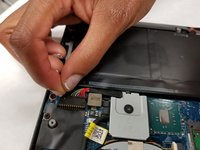
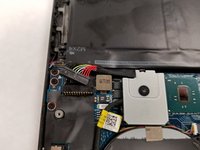
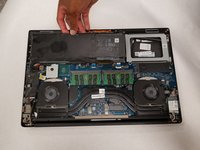
    1. Dell Precision 5510 Battery Replacement, Battery: step 3, image 1 of 2 Dell Precision 5510 Battery Replacement, Battery: step 3, image 2 of 2
      • Unplug the connection that links the battery to the computer.

      Ask FixBot

      Add Comment

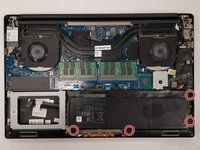
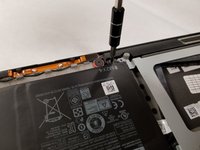
    2. Dell Precision 5510 Battery Replacement: step 4, image 1 of 2 Dell Precision 5510 Battery Replacement: step 4, image 2 of 2
      • Remove the four 4.0 mm JIS #0 screws surrounding the battery.

      Ask FixBot

      Add Comment

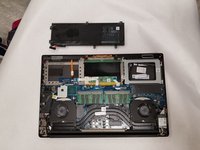
    3. Dell Precision 5510 Battery Replacement: step 5, image 1 of 2 Dell Precision 5510 Battery Replacement: step 5, image 2 of 2
      • Carefully remove the battery from the computer.

      Ask FixBot

      Add Comment

Conclusion

To reassemble your device, follow these instructions in reverse order.

Cancel: I did not complete this guide.

4 other people completed this guide.

Atlanta Phelps

Member since: 08/28/18

400 Reputation

3 Guides authored

Team

IUPUI, Team S1-G5, Arle Fall 2018 Member of IUPUI, Team S1-G5, Arle Fall 2018

IUPUI-ARLE-F18S1G5

3 Members

36 Guides authored

1 Guide Comment

Thanks for the post!

KCMax - Reply Share

Add Comment

View Statistics:

Past 24 Hours: 4

Past 7 Days: 21

Past 30 Days: 73

All Time: 9,441