
Dell Latitude E7470 SSD Replacement

Hyperion and 2 other contributors
Last updated on Jan 21, 2021
Views: 24K
View statistics:
- Past 24 Hours:
- 7
- Past 7 Days:
- 46
- Past 30 Days:
- 156
- All Time:
- 23,626
Comments: 9
1 comment on steps, 8 guide comments.
Go to guide commentsCompleted: 6 7
6 people have marked this guide "completed." Will you be next?
7 people have marked this guide "completed." Including you — great job!
Favorites: 5 6
5 people have favorited (and subscribed to) this guide. Will you be next?
6 people have favorited (and subscribed to) this guide — including you!
Community-Contributed Guide
An awesome member of our community made this guide. It was not created by iFixit staff.
Introduction
Go to step 1 ↓Replacing the internal m.2 SSD of a Dell Latitude E7470. You can only choose a 2280 m.2 SSD, the other sizes are not compatible with this PC.
What you need


-
-
-
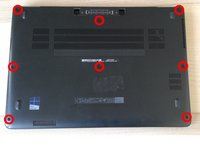
Begin by removing the 8 screws circled in red on the photo opposite with a Philips # 0 screwdriver.
-
Next, using the iFixit Opening Picks, lift the cover up from the dock connector. Unclip it gently.
 Ask FixBot
-
-
-
After removing the cover, the SSD slot is on the bottom right, right next to the battery.
-
To remove the SSD, simply remove the single screw that holds it. Lift the SSD to a 30-degree angle and pull it from its slot.
-
-
-




To reassemble your device, follow the instructions in reverse order.
Cancel: I did not complete this guide.
6 other people completed this guide.
Special thanks to these translators:
100%


These translators are helping us fix the world! Want to contribute?
Start translating ›

8 Guide Comments
It’s not working for me with Kingston nvme NV1
If no ram or ssd do ya got to put windows 10 back on I got no recover usb .or a dell recovery usb with 10 or what was original on it .its a e7470
