
Dell Latitude E7250 SSD Replacement

Robert Townsend and 2 other contributors
Last updated on Jan 15, 2018
Views: 14K
View statistics:
- Past 24 Hours:
- 2
- Past 7 Days:
- 45
- Past 30 Days:
- 169
- All Time:
- 13,832
Comments: 1
1 guide comment.
Go to guide commentsCompleted: 8 9
8 people have marked this guide "completed." Will you be next?
9 people have marked this guide "completed." Including you — great job!
Favorites: 0 1
No one has favorited (and subscribed to) this guide. Will you be the first?
1 person has favorited (and subscribed to) this guide — and that's you!
Better Introduction
Improve this guide by completing or revising its introduction.
What you need
Tools

-
-
-
Slide the battery release all the way to the right.
-
Once the battery release is pulled all the way, the battery will lift itself slightly from the casing.
-
Remove the battery.
 Ask FixBot
-
-
-
-
-
With the battery removed two screws will be visible. These will need to be removed.
-
Placing your hands on either side of the panel, push down and pull back to slide the plate back and off.
-
-
-
-
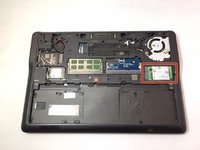
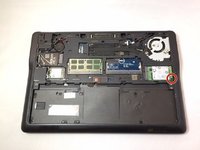
Locate your SSD, it is on the right side and held in with a small screw.
-
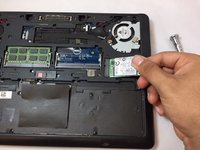
Unscrew the SSD carefully. Once done, the SSD will "pop" upwards at an angle making removal easy.
-
Gently grasp the SSD on either side with your thumb and forefinger and pull away from the computer.
-
-


To reassemble your device, follow these instructions in reverse order.
Cancel: I did not complete this guide.
8 other people completed this guide.

Team

University of North Texas, Team S2-G4, Thompson Fall 2017 Member of University of North Texas, Team S2-G4, Thompson Fall 2017
UNT-THOMPSON-F17S2G4
4 Members
36 Guides authored
