Free Shipping on Domestic Orders $75+

Dell Latitude E6530 CMOS Battery Replacement

What you need

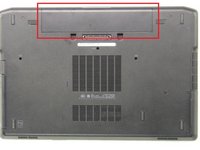
    1. Dell Latitude E6530 CMOS Battery Replacement, Slide tabs outward and remove Battery: step 1, image 1 of 2 Dell Latitude E6530 CMOS Battery Replacement, Slide tabs outward and remove Battery: step 1, image 2 of 2
      • Make sure your computer is unplugged and off before removing the battery

      Ask FixBot

      Add Comment

    2. Dell Latitude E6530 CMOS Battery Replacement, Unscrew and remove Base Cover: step 2, image 1 of 2 Dell Latitude E6530 CMOS Battery Replacement, Unscrew and remove Base Cover: step 2, image 2 of 2
      • Use your Phillips screwdriver (4 x M2.5 x 8mm)

      Ask FixBot

      Add Comment

    3. Dell Latitude E6530 CMOS Battery Replacement, Disconnect and remove CMOS Battery.: step 3, image 1 of 2 Dell Latitude E6530 CMOS Battery Replacement, Disconnect and remove CMOS Battery.: step 3, image 2 of 2
      • Please remove carefully

      Ask FixBot

      Add Comment

      • Carefully

      Ask FixBot

      Add Comment

Conclusion

Make sure you put everything back together

Cancel: I did not complete this guide.

One other person completed this guide.

Jordon Dozier

Member since: 02/10/21

1,663 Reputation

12 Guides authored

Team

RampUP America, Inc. Member of RampUP America, Inc.

Community

45 Members

12,153 Guides authored

0 Guide Comments

Add Comment

View Statistics:

Past 24 Hours: 0

Past 7 Days: 14

Past 30 Days: 59

All Time: 2,366