What you need
-
-
-
Remove the eight screws holding down the rear panel using a Phillips #0 Screwdriver. Carefully remove base cover by hand.
 Ask FixBot
-
-
-
-
-
-
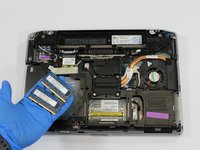
Squeeze the tabs on opposing sides of the RAM cards to unlock them.
-
Gently remove the RAM cards by hand.
-
-


To reassemble your device, follow these instructions in reverse order.
Cancel: I did not complete this guide.
3 other people completed this guide.

3 Guide Comments
Perhaps removing the battery might be a good first step? I always do when mucking about inside the case. And in the e6420 it can be done BEFORE even removing the back cover. Never know when a small something might decide to fall into the guts of the machine ....
Additional important information. Contrary to the what the instructions above state, there are more than eight screws to remove! There is one more in the center of the back cover which is not circled in red in the illustration. It is the same spec screw as the other eight. Then there are an additional two screws on either side of the docking port, which are a bit longer and a different pitch/size. Without removing these three additional screws it will be impossible to remove the back cover, no matter how hard you try!
Also there more than eight screws to remove! There is one in the center of the back cover which is not circled in red, same spec screw as the other eight. Then there are to two screws on either side of the docking port, which are longer a different pitch/size looking at'em. Without removing these three screws it will be impossible to remove the back cover ...
