Free Shipping on Domestic Orders $75+

Dell Latitude E6410 Cooling Fan Replacement

What you need

    1. Dell Latitude E6410 Cooling Fan Replacement, Cooling Fan: step 1, image 1 of 2 Dell Latitude E6410 Cooling Fan Replacement, Cooling Fan: step 1, image 2 of 2
      Ask FixBot

      Add Comment

    2. Dell Latitude E6410 Cooling Fan Replacement: step 2, image 1 of 2 Dell Latitude E6410 Cooling Fan Replacement: step 2, image 2 of 2
      • Remove the following 5mm screws.

      • Loosen the middle 5mm screw.

      Ask FixBot

      Add Comment

    3. Dell Latitude E6410 Cooling Fan Replacement: step 3, image 1 of 1
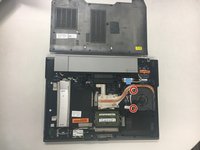
      • Remove the back cover by sliding it downwards.

      Ask FixBot

      Add Comment

    4. Dell Latitude E6410 Cooling Fan Replacement: step 4, image 1 of 2 Dell Latitude E6410 Cooling Fan Replacement: step 4, image 2 of 2
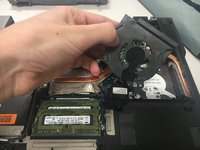
      • Unscrew the following 2mm screws.

      • Remove the fan case.

      • Do not pull hard enough to break the wires connected to the motor.

      Ask FixBot

      Add Comment

    5. Dell Latitude E6410 Cooling Fan Replacement: step 5, image 1 of 1
      • Unscrew the 1mm screws on the fan case.

      Ask FixBot

      Add Comment

    6. Dell Latitude E6410 Cooling Fan Replacement: step 6, image 1 of 1
      • Remove the fan by pulling it away from the motor.

      Ask FixBot

      Add Comment

Conclusion

To reassemble your device, follow these instructions in reverse order.

Cancel: I did not complete this guide.

5 other people completed this guide.

Stephen Tate

Member since: 11/06/17

997 Reputation

4 Guides authored

Team

Baylor, Team S8-G2, Johnson Fall 2017 Member of Baylor, Team S8-G2, Johnson Fall 2017

BU-JOHNSON-F17S8G2

1 Member

48 Guides authored

0 Guide Comments

Add Comment

View Statistics:

Past 24 Hours: 0

Past 7 Days: 8

Past 30 Days: 29

All Time: 2,923