Free Shipping on Domestic Orders $75+

Dell Latitude E4200 Keyboard Replacement

What you need

    1. Dell Latitude E4200 Keyboard Replacement, Power Button Panel: step 1, image 1 of 1
      • Open computer.

      Ask FixBot

      Add Comment

    2. Dell Latitude E4200 Keyboard Replacement: step 2, image 1 of 1
      • Slide any tool with a flat surface under the side bottom right corner of front panel and pry the front panel out of place.

      • A small flat head screwdriver would be an ideal tool to use during this step.

      Ask FixBot

      Add Comment

    3. Dell Latitude E4200 Keyboard Replacement: step 3, image 1 of 1
      • Once out of place, position your thumbs under the bottom of the panel and pull upwards.

      Ask FixBot

      Add Comment

    1. Dell Latitude E4200 Keyboard Replacement, Keyboard: step 4, image 1 of 1
      • Use a PH00 screwdriver to unscrew the screw.

      Ask FixBot

      Add Comment

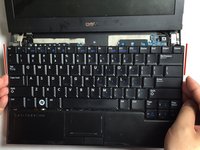
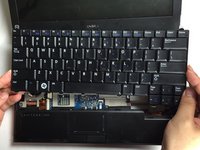
    2. Dell Latitude E4200 Keyboard Replacement: step 5, image 1 of 2 Dell Latitude E4200 Keyboard Replacement: step 5, image 2 of 2
      • Use your hands to gently lift the keyboard from the device.

      Ask FixBot

      Add Comment

    3. Dell Latitude E4200 Keyboard Replacement: step 6, image 1 of 1
      • Gently turn the keyboard over.

      Ask FixBot

      Add Comment

    4. Dell Latitude E4200 Keyboard Replacement: step 7, image 1 of 1
      • Be careful not to disconnect the keyboard connector.

      Ask FixBot

      Add Comment

    5. Dell Latitude E4200 Keyboard Replacement: step 8, image 1 of 1
      • Use a flat head screwdriver to flip the keyboard connector up. This will allow you to disconnect the keyboard and remove it.

      Ask FixBot

      Add Comment

    6. Dell Latitude E4200 Keyboard Replacement: step 9, image 1 of 1
      • Completely lift the keyboard from the device, as they are now disassembled.

      Ask FixBot

      Add Comment

Conclusion

To reassemble your device, follow these instructions in reverse order.

Cancel: I did not complete this guide.

3 other people completed this guide.

Michelina Carbone

Member since: 03/22/15

197 Reputation

1 Guide authored

Team

Baylor, Team 5-6, Williams Spring 2015 Member of Baylor, Team 5-6, Williams Spring 2015

BU-WILLIAMS-S15S5G6

4 Members

72 Guides authored

0 Guide Comments

Add Comment

View Statistics:

Past 24 Hours: 4

Past 7 Days: 23

Past 30 Days: 105

All Time: 4,859