Free Shipping on Domestic Orders $75+

Dell Latitude D620 Keyboard Replacement

What you need

  1. Dell Latitude D620 Keyboard Replacement, Keyboard: step 1, image 1 of 1
    • Power down the laptop and remove the battery.

    • Open the laptop cover all of the way.

    Ask FixBot

    Add Comment

  2. Dell Latitude D620 Keyboard Replacement: step 2, image 1 of 3 Dell Latitude D620 Keyboard Replacement: step 2, image 2 of 3 Dell Latitude D620 Keyboard Replacement: step 2, image 3 of 3
    • Locate the notch under the cover at the top of the keyboard

    • Using the spudger as a lever, lift the plastic covering

    • Carefully remove the rest of the covering from right to left

    Ask FixBot

    Add Comment

  3. Dell Latitude D620 Keyboard Replacement: step 3, image 1 of 1
    • Unscrew the top portion of the keyboard using a #00 screwdriver

    Ask FixBot

    Add Comment

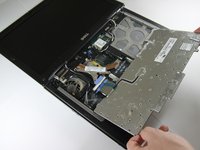
  4. Dell Latitude D620 Keyboard Replacement: step 4, image 1 of 1
    • Hold keyboard from the top and gently pull towards the LCD screen to remove the keyboard from the case

    • Don't pull on the keyboard too forcefully because it is attached to the motherboard with a short, thin ribbon cable

    Ask FixBot

    Add Comment

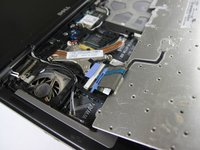
  5. Dell Latitude D620 Keyboard Replacement: step 5, image 1 of 2 Dell Latitude D620 Keyboard Replacement: step 5, image 2 of 2
    • Once keyboard is out of the case, lay it face-down on the track pad

    Ask FixBot

    Add Comment

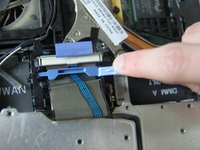
  6. Dell Latitude D620 Keyboard Replacement: step 6, image 1 of 2 Dell Latitude D620 Keyboard Replacement: step 6, image 2 of 2
    • Using a small spudger, pull back on the black bar to release the blue lever

    Ask FixBot

    Add Comment

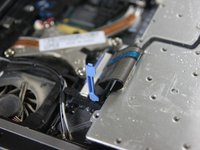
  7. Dell Latitude D620 Keyboard Replacement: step 7, image 1 of 1
    • Pull up on the metal bar connected to the socket to detach the ribbon cable

    Ask FixBot

    Add Comment

Conclusion

To reassemble your device, follow these instructions in reverse order.

Cancel: I did not complete this guide.

10 other people completed this guide.

Miguel Wong

Member since: 04/15/10

562 Reputation

3 Guides authored

Team

Cal Poly, Team 24-35, Regan Spring 2010 Member of Cal Poly, Team 24-35, Regan Spring 2010

CPSU-REGAN-S10S24G35

4 Members

4 Guides authored

1 Guide Comment

Check out this keyboard at a great price on bcdelectrostore.com

http://www.bcdelectrostore.com/magento/l...

bob harris - Reply Share

Add Comment

View Statistics:

Past 24 Hours: 3

Past 7 Days: 21

Past 30 Days: 73

All Time: 17,426