Free Shipping on Domestic Orders $75+

Dell Latitude D620 CD Drive Replacement

What you need

    1. Dell Latitude D620 CD Drive Replacement, Keyboard: step 1, image 1 of 1
      • Power down the laptop and remove the battery.

      • Open the laptop cover all of the way.

      Ask FixBot

      Add Comment

    2. Dell Latitude D620 CD Drive Replacement: step 2, image 1 of 3 Dell Latitude D620 CD Drive Replacement: step 2, image 2 of 3 Dell Latitude D620 CD Drive Replacement: step 2, image 3 of 3
      • Locate the notch under the cover at the top of the keyboard

      • Using the spudger as a lever, lift the plastic covering

      • Carefully remove the rest of the covering from right to left

      Ask FixBot

      Add Comment

    3. Dell Latitude D620 CD Drive Replacement: step 3, image 1 of 1
      • Unscrew the top portion of the keyboard using a #00 screwdriver

      Ask FixBot

      Add Comment

    4. Dell Latitude D620 CD Drive Replacement: step 4, image 1 of 1
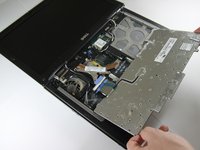
      • Hold keyboard from the top and gently pull towards the LCD screen to remove the keyboard from the case

      • Don't pull on the keyboard too forcefully because it is attached to the motherboard with a short, thin ribbon cable

      Ask FixBot

      Add Comment

    5. Dell Latitude D620 CD Drive Replacement: step 5, image 1 of 2 Dell Latitude D620 CD Drive Replacement: step 5, image 2 of 2
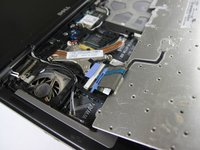
      • Once keyboard is out of the case, lay it face-down on the track pad

      Ask FixBot

      Add Comment

    6. Dell Latitude D620 CD Drive Replacement: step 6, image 1 of 2 Dell Latitude D620 CD Drive Replacement: step 6, image 2 of 2
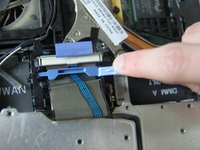
      • Using a small spudger, pull back on the black bar to release the blue lever

      Ask FixBot

      Add Comment

    7. Dell Latitude D620 CD Drive Replacement: step 7, image 1 of 1
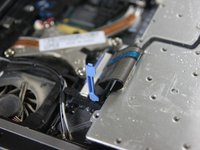
      • Pull up on the metal bar connected to the socket to detach the ribbon cable

      Ask FixBot

      Add Comment

    1. Dell Latitude D620 CD Drive Replacement, CD Drive: step 8, image 1 of 2 Dell Latitude D620 CD Drive Replacement, CD Drive: step 8, image 2 of 2
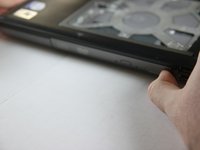
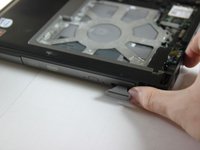
      • Press in the tab on the bottom right side of the CD drive

      • The tab comes out on its own; there is no need to pull it out manually.

      Ask FixBot

      Add Comment

    2. Dell Latitude D620 CD Drive Replacement: step 9, image 1 of 1
      • Gently pull the tab to remove the disk tray.

      Ask FixBot

      Add Comment

Conclusion

To reassemble your device, follow these instructions in reverse order.

Cancel: I did not complete this guide.

10 other people completed this guide.

Ivan

Member since: 04/15/10

203 Reputation

1 Guide authored

Team

Cal Poly, Team 24-35, Regan Spring 2010 Member of Cal Poly, Team 24-35, Regan Spring 2010

CPSU-REGAN-S10S24G35

4 Members

48 Guides authored

0 Guide Comments

Add Comment

View Statistics:

Past 24 Hours: 1

Past 7 Days: 11

Past 30 Days: 62

All Time: 9,079