Dell Latitude D600 RAM (Main Memory) Replacement

Joseph and
Last updated on Aug 18, 2014
Views: 3.7K
View statistics:
- Past 24 Hours:
- 3
- Past 7 Days:
- 25
- Past 30 Days:
- 119
- All Time:
- 3,667
Comments: 1
1 guide comment.
Go to guide commentsCompleted: 6 7
6 people have marked this guide "completed." Will you be next?
7 people have marked this guide "completed." Including you — great job!
Favorites: 4 5
4 people have favorited (and subscribed to) this guide. Will you be next?
5 people have favorited (and subscribed to) this guide — including you!
Community-Contributed Guide
An awesome member of our community made this guide. It was not created by iFixit staff.
What you need
Tools

Introduction
Go to step 1 ↓This guide will show how to add RAM or replace existing RAM on the Latitude D600
-
-
-
-
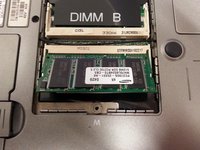
Find the panel underneath the microsoft product key sticker, the panel is labeled with an M
-
Unscrew the single screw above the M
-
-
-
Pull off the panel to reveal the RAM
-
RAM is held in by two tabs, pull each tab to the side and the RAM will pop up
-
-
-
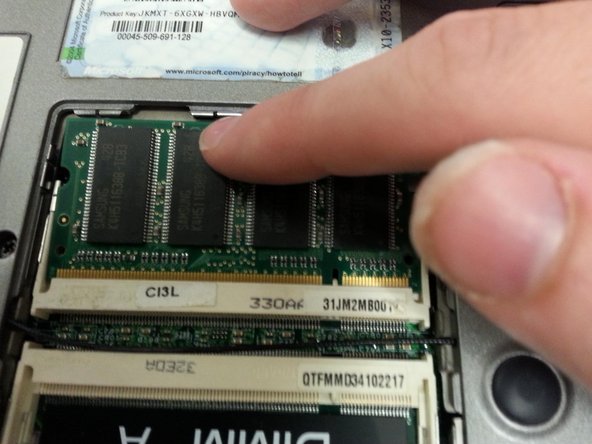
To add or replace RAM, place the memory into the slot at an angle
-
Make sure you line it up correctly
-
If it is in correctly it should stay up at an angle by itself
-
Then push down in the middle until it clicks into place
-
-
-
The RAM should be secured by the tabs where the two semi circles are on the RAM
-
If it is not secure, just gently pull it out and try again, use the images to help you out
-
-

 Ask FixBot






To reassemble your device, follow these instructions in reverse order.
Cancel: I did not complete this guide.
6 other people completed this guide.