Introduction
A CD-ROM Drive is a necessity when trying to use a CD or DVD on a laptop. It is important to know that if there is difficulty among the CD-ROM Drive and you would like to replace it , a screw driver would be handy. This repair guide would allow you to replace your CD-ROM Drive and successfully be able to use it.
What you need
-
-
-
The CD ROM Drive is located on the right side of the laptop.
-
Use the Phillips #1 to unscrew the 6mm lock screw. The screw is located underneath the CD-ROM Drive with a lock symbol on it.
 Ask FixBot
-
-
-
-
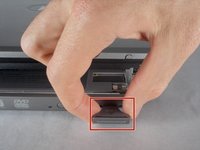
remove the CD ROM Drive: push the indicated button in towards the laptop and release. The button will pop out.
-
-
-
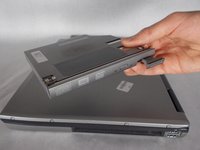
Remove the CD ROM Drive: Pull on the now released button and the CD ROM Drive will come out.
-
-


To reassemble your device, follow these instructions in reverse order.

Team

UMass Dartmouth, Team S2-G6, Bernier Spring 2018 Member of UMass Dartmouth, Team S2-G6, Bernier Spring 2018
UMASSD-BERNIER-S18S2G6
3 Members
48 Guides authored
