Introduction
This is a RAM replacement guide for the Dell Latitude 5500. Replacing or upgrading the RAM can improve overall system performance, increase multitasking capabilities, and help resolve issues such as freezing, slow performance, or memory-related errors. Before starting, ensure the device is completely powered off, unplugged from any power source, and handled in a static-free environment to prevent damage to sensitive internal components.
What you need
-
-
-
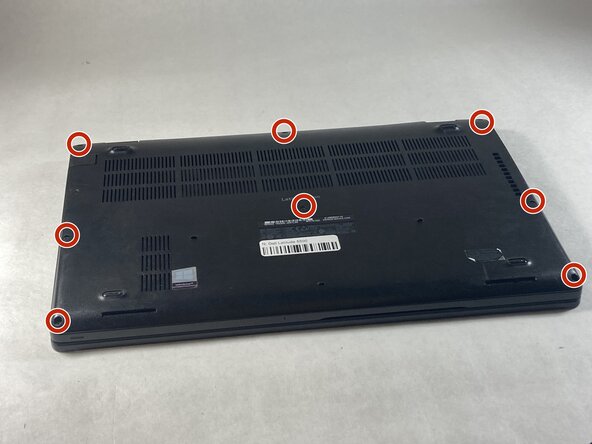
Use a Phillips #0 screwdriver to loosen the eight captive screws on the back panel.
 Ask FixBot
-
-
-
-
Use a Phillips #0 screwdriver to remove the single 6 mm screw on the right side of the battery.
-
-
-
Using hands or plastic prying tools, remove the flat-topped (low-profile) connector at the top of the battery.
-
Remove the battery.
-
-
-


To reassemble your device, follow these instructions in reverse order.

Team

UMass Dartmouth, Team 6-6, Botvin Spring 2026 Member of UMass Dartmouth, Team 6-6, Botvin Spring 2026
UMASSD-BOTVIN-S26S6G6
3 Members
72 Guides authored
