Introduction
You may need to replace your device's battery if it's overheating, won't turn on, or experiencing significantly reduced capacity.
Before taking any steps to remove the battery, ensure that your issue can't be solved through the troubleshooting guides linked on the Dell Latitude 5500 device page.
To remove the battery from your device, you need to take off the back panel and unscrew the battery from the frame.
Warning: Ensure that the battery is fully drained before disassembly. Piercing a charged battery may result in a spark or a shock.
If you open your device and find that the battery is swollen, you need to be especially careful. Informational guides on how to deal with a swollen battery can be found elsewhere on iFixIt.
What you need
-
-
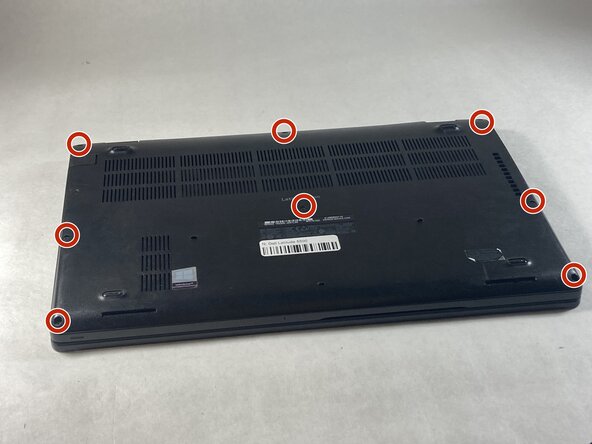
Use a Phillips #0 screwdriver to loosen the eight captive screws on the back panel.
 Ask FixBot
-
-
-
-
Use a Phillips #0 screwdriver to remove the single 6 mm screw on the right side of the battery.
-
-
-
Using hands or plastic prying tools, remove the flat-topped (low-profile) connector at the top of the battery.
-
Remove the battery.
-


To reassemble your device, follow these instructions in reverse order.
Cancel: I did not complete this guide.
One other person completed this guide.

Team

UMass Dartmouth, Team 6-6, Botvin Spring 2026 Member of UMass Dartmouth, Team 6-6, Botvin Spring 2026
UMASSD-BOTVIN-S26S6G6
3 Members
6 Guides authored
