
Dell Latitude 3520 Battery Replacement

Shawn Smith and 4 other contributors
Last updated on Jul 3, 2026
Views: 4.8K
View statistics:
- Past 24 Hours:
- 5
- Past 7 Days:
- 70
- Past 30 Days:
- 342
- All Time:
- 4,842
Comments: 2
2 comments on steps.
Completed: 1 2
1 person has marked this guide "completed." Will you be next?
2 people have marked this guide "completed." Including you — great job!
Favorites: 0 1
No one has favorited (and subscribed to) this guide. Will you be the first?
1 person has favorited (and subscribed to) this guide — and that's you!
Needs More Images
A few more images would make this guide's procedures crystal clear.
Introduction
Go to step 1 ↓Please refer to this manual for instructions on replacing your computer's battery. Ensure you have the necessary tools on hand, including a plastic scribe and a Phillips 0 driver.
By following a few straightforward steps, you can effectively address battery-related problems and restore your laptop's optimal performance. Given the crucial role of the laptop battery, it is imperative to promptly tackle any battery issues.
What you need
Fix Kit
This kit contains all the parts and tools needed to complete this guide.

Parts
-
Dell G91J0 Laptop Battery$40.99


Tools
-
Spudger4.9


-
-
-
Push the microSD-card to eject it from the slot.
-
Remove the microSD-card from the computer.
 Ask FixBot
-
-
-
-
-
Loosen the nine screws 2mm Phillips #0 that secure the base cover to the assembly.
-
Using a plastic scribe, pry open the base cover starting from the recesses located in the indents near the hinges at the top edge of the base cover.
-
Carefully lift and remove the base cover.
-
-
-
-
-
Use the white side to disconnect. The rainbow side is extremely difficult to get back together
-
Slide the metal above the connector on the battery to unlock. -DO NOT USE THE RAINBW SIDE TO DISCONNECT. USE THE WHITE SIDE.
-
-
-


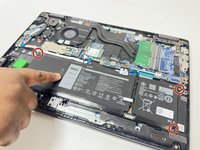
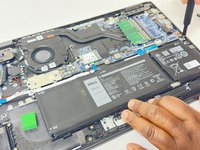

To reassemble your device, follow these instructions in reverse order.
Cancel: I did not complete this guide.
One other person completed this guide.

Team

University of New Orleans, Team 4-2, McDonald Fall 2023 Member of University of New Orleans, Team 4-2, McDonald Fall 2023
UNO-MCDONALD-F23S4G2
4 Members
84 Guides authored
