Introduction
If your laptop keeps losing internet connection, cannot see wireless networks, or has very weak signal strength, the WiFi card may be failing. The WiFi card allows your Latitude 3420 to connect to wireless networks, so a faulty one can make everyday tasks frustrating. To replace it, you will remove the bottom cover, disconnect the antenna cables, unscrew the card, and swap in a new one. Reconnect the antennas, secure the card, and reassemble the laptop.
What you need
-
-
-
Close the laptop lid and set the laptop down with the lower case facing you.
-
Use a Phillips #00 screwdriver to remove the seven 7 mm-long screws securing the lower case.
 Ask FixBot
-
-
-
Insert an opening tool into the seam between the lower case and chassis.
-
Pry around the entire perimeter until the lower case fully releases.
-
Remove the lower case.
-
-
-
-
-
-
Use an opening tool to gently push the battery connector directly out of its motherboard socket.
-
Disconnect the second cable by pushing the connector toward the battery as well.
-
-
-
-
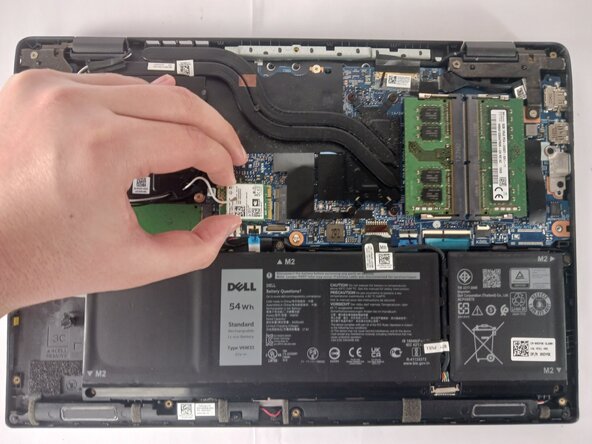
Remove the single 3 mm-long Phillips #00 screwdriver securing the Wi-Fi card.
-
-
-
Use the tip of a spudger to pry up and disconnect the two Wi-Fi card coaxial cables.
-
Pull the Wi-Fi card directly out of its socket.
-
-




To reassemble your device, follow the above steps in reverse order.
Take your e-waste to an R2 or e-Stewards certified recycler.
Repair didn’t go as planned? Try some basic troubleshooting or ask our Answers community for help.

Team

UMass Dartmouth, Team 1-3, Botvin Fall 2025 Member of UMass Dartmouth, Team 1-3, Botvin Fall 2025
UMASSD-BOTVIN-F25S1G3
3 Members
72 Guides authored
