Introduction
In this guide, we will be showing you how to replace the fan setup within the Dell Latitude 3380.
The fan is an important part of the laptop as it helps keep all the parts cool which prevents overheating. When a part is overheated, it will not perform as well as it should.
What you need
-
-
-
Turn the laptop over so that the back is facing up.
-
Remove the nine 3 mm screws with a Phillips #0 screwdriver.
 Ask FixBot
-
-
-
-
-
-
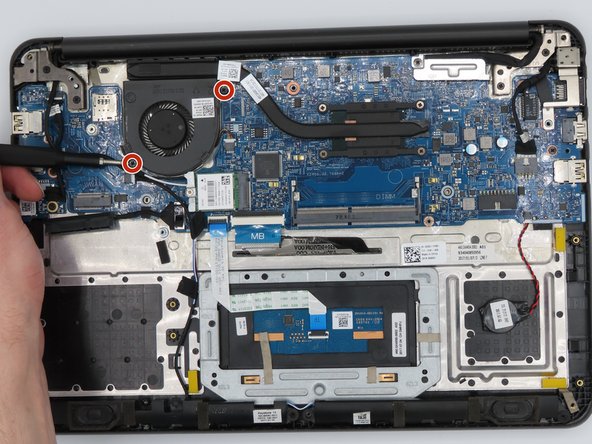
Loosen the four captive screws on the heatsink using a Phillips #0 screwdriver.
-
-
Tool used on this step:Tweezers$4.99
-
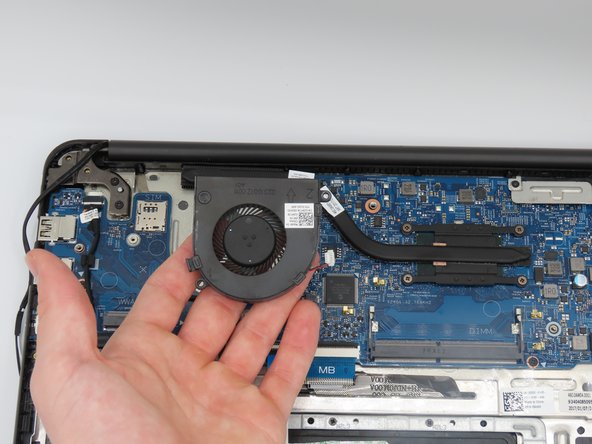
Using tweezers, loosen the power connector from the fan to the motherboard, fully disconnecting the fan.
-





To reassemble your device, follow these instructions in reverse order.

Team

University of Kentucky, Team 1-4, Kaufmann Spring 2023 Member of University of Kentucky, Team 1-4, Kaufmann Spring 2023
UKY-KAUFMANN-S23S1G4
2 Members
48 Guides authored
