
Dell Latitude 3380 Battery Replacement

Michael Wood and 3 other contributors
Last updated on Dec 21, 2021
Views: 1.5K
View statistics:
- Past 24 Hours:
- 3
- Past 7 Days:
- 17
- Past 30 Days:
- 79
- All Time:
- 1,465
Comments: 0
No one has left comments on this guide. Will you be first?
Go to guide commentsCompleted: 0 1
No one has marked this guide "completed." Will you be the first?
1 person has marked this guide "completed." It's you — great job!
Favorites: 0 1
No one has favorited (and subscribed to) this guide. Will you be the first?
1 person has favorited (and subscribed to) this guide — and that's you!
Introduction
Go to step 1 ↓If your Dell Latitude 3380 is failing to hold a charge, it most likely has a dead battery, which will require a replacement in order to fix the problem.
Before starting, make sure to properly shut down the laptop and drain all power. Also, make sure you have the replacement battery and the proper tools in order to do the repairs.
What you need


-
-
-
Turn the laptop over so that the back is facing up.
-
Remove the nine 3 mm screws with a Phillips #0 screwdriver.
 Ask FixBot
-
-
-
-
-
-
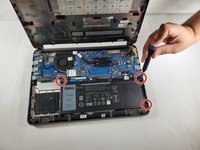
Remove the three 3 mm screws using a Phillips #0 screwdriver
-
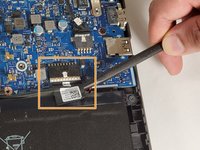
Disconnect the the cable connected to the battery using a spudger.
-
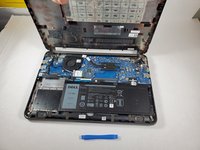
Lift up on the outer edges of the battery to remove it from the laptop.
-
-


To reassemble your device, follow these instructions in reverse order.

Team

Gateway, Team 1-3, Pee Fall 2021 Member of Gateway, Team 1-3, Pee Fall 2021
GCC-PEE-F21S1G3
3 Members
72 Guides authored
