Introduction
If your Dell Latitude 3150 no longer reads SD cards, it may be time to replace the card reader. This guide will walk you through the steps to safely and successfully remove and install a new SD card reader. If you do not know how to solder, make sure to get help or watch some online videos. Here is a video we recommend.
What you need
-
-
-
Remove the seven 5 mm screws using a Phillips #1 screwdriver.
-
Pry the back open with a plastic opening tool, working around the edges until all the retaining clips are disengaged.
 Ask FixBot
-
-
-
Remove the two Phillips 3 mm screws connected to the battery using a Phillips #1 screwdriver.
-
Carefully lift the battery and unplug the battery cable from the device.
-
Remove the battery from the laptop.
-
-
-
-
-
-
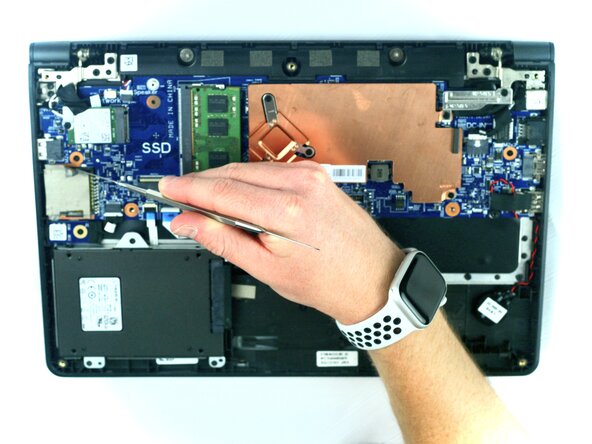
Using the metal spudger, remove the tape from the SD card reader.
-
-
-
Use the soldering iron to heat the soldered wires around the SD card reader and carefully lift the reader.
-
-




To reassemble your device, follow these instructions in reverse order.

Team

Texas Tech, Team 2-3, Johansen Fall 2025 Member of Texas Tech, Team 2-3, Johansen Fall 2025
TTU-JOHANSEN-F25S2G3
5 Members
60 Guides authored
