Free Shipping on Domestic Orders $75+

Dell Inspiron N5050 Battery Replacement

What you need

  1. Dell Inspiron N5050 Battery Replacement, Battery: step 1, image 1 of 1
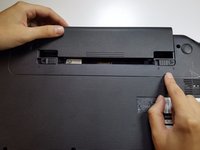
    • Flip your laptop over to view the bottom and locate the two locks.

  2. Dell Inspiron N5050 Battery Replacement: step 2, image 1 of 1
    • Slide the two locks away from each other.

    • Sliding these locks will loosen the battery to allow removal.

  3. Dell Inspiron N5050 Battery Replacement: step 3, image 1 of 2 Dell Inspiron N5050 Battery Replacement: step 3, image 2 of 2
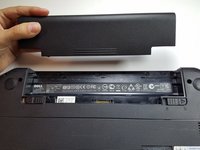
    • Pull battery out of the laptop.

    • Your laptop's battery should be completely removed.

Conclusion

To reassemble your device, follow these instructions in reverse order.

7 other people completed this guide.

Tyler

Member since: 06/19/12

5,088 Reputation

16 Guides authored

Team

TechForce Member of TechForce

Business

2 Members

29 Guides authored

0 Guide Comments

Add Comment

View Statistics:

Past 24 Hours: 2

Past 7 Days: 18

Past 30 Days: 65

All Time: 5,162