Introduction
Use this guide to replace the battery in your Dell Inspiron M531R-5535 laptop.
A functional battery provides power to your laptop. Eventually, laptop batteries will rapidly drain after going through a repeated amount of charge cycles. If you notice that your charged battery is draining more quickly than usual, consider calibrating your battery to determine an accurate charging capacity. If you continue to notice significant drops in battery percentage, you should replace your battery.
A punctured battery can cause a dangerous fire. If your battery is swollen, take appropriate precautions.
Make sure to power off your laptop completely and disconnect from any external power source prior to beginning the process.
-
-
-
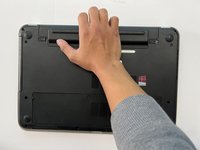
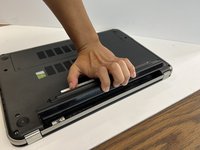
Flip laptop over so the battery component is easily located.
 Ask FixBot
-
-
-


To reassemble your device, follow these instructions in reverse order.

Team

CSU Los Angeles, Team 6-5, Adachi Fall 2022 Member of CSU Los Angeles, Team 6-5, Adachi Fall 2022
CSULA-ADACHI-F22S6G5
3 Members
60 Guides authored
