Free Shipping on Domestic Orders $75+

Dell Inspiron 8200 Dial-Up Modem Card Replacement

What you need

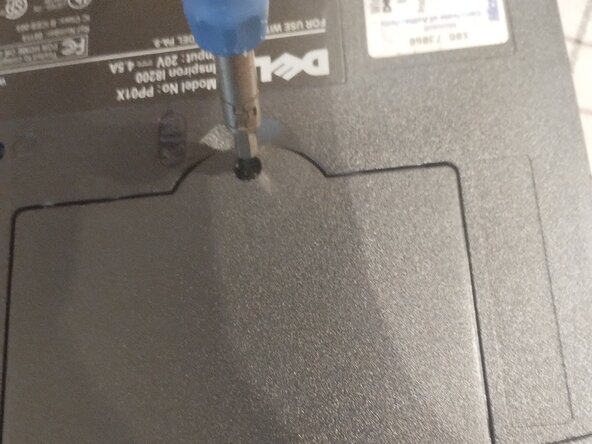
  1. Dell Inspiron 8200 Dial-Up Modem Card Replacement, Preparation: step 1, image 1 of 2 Dell Inspiron 8200 Dial-Up Modem Card Replacement, Preparation: step 1, image 2 of 2
    • First,The K/M Screw needs to be removed, Then remove the lid by prying next to the screw hole WITH YOUR FINGERS OR A PLASTIC SPUDGER, as metal can and will damage the plastic

  2. Dell Inspiron 8200 Dial-Up Modem Card Replacement, Accessing and removing the Card: step 2, image 1 of 2 Dell Inspiron 8200 Dial-Up Modem Card Replacement, Accessing and removing the Card: step 2, image 2 of 2
    • Now that the lid is removed remove the screw for the modem card,Then unplug the black cable by pulling then pull the card out

  3. Dell Inspiron 8200 Dial-Up Modem Card Replacement, Installing the new card: step 3, image 1 of 2 Dell Inspiron 8200 Dial-Up Modem Card Replacement, Installing the new card: step 3, image 2 of 2
    • Connect the black cable and put in the new card aligned with the connector the same way as it was before and you're finished!

    • Also, don't forget the screw!

  4. Dell Inspiron 8200 Dial-Up Modem Card Replacement, Finalizing: step 4, image 1 of 1
    • Now put the cover back on by pushing and make sure the lid is straight, Then Screw it in again

Finish Line

One other person completed this guide.

Waterdragon

Member since: 01/12/25

483 Reputation

4 Guides authored

0 Guide Comments

Add Comment

View Statistics:

Past 24 Hours: 0

Past 7 Days: 0

Past 30 Days: 2

All Time: 38