Free Shipping on Domestic Orders $75+

Dell Inspiron 8200 CD-RW/DVD Drive Replacement

What you need

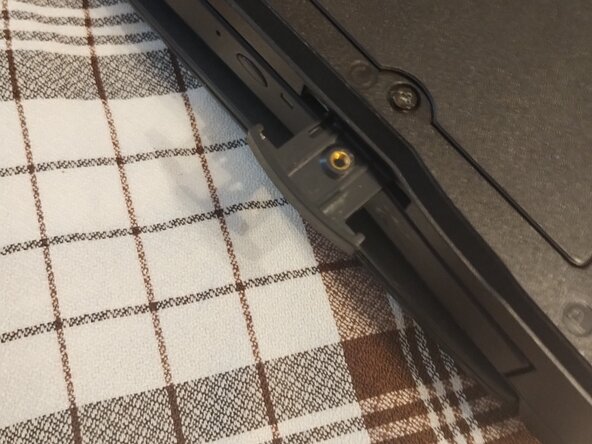
    1. Dell Inspiron 8200 CD-RW/DVD Drive Replacement, Preparation: step 1, image 1 of 1
      • First, The Screw Marked 'C' Need to be Unscrewed and I cannot emphasize how important it is to use the right screwdriver, as the screw easily strips,So If You Think You Can Get Away with a Bigger Screwdriver,Nope.

      • It's also a captive screw so it stays in place

      Ask FixBot

      Add Comment

    2. Dell Inspiron 8200 CD-RW/DVD Drive Replacement, Removing the old drive: step 2, image 1 of 2 Dell Inspiron 8200 CD-RW/DVD Drive Replacement, Removing the old drive: step 2, image 2 of 2
      • Now pull out the tab under the optical drive,now sometimes it will come out and if it does, Continue pulling until the drive comes out, if it doesn't do the same until it comes out

      Ask FixBot

      Add Comment

    3. Dell Inspiron 8200 CD-RW/DVD Drive Replacement, Installing the new drive: step 3, image 1 of 2 Dell Inspiron 8200 CD-RW/DVD Drive Replacement, Installing the new drive: step 3, image 2 of 2
      • Now set the old drive aside and install the replacement, In my case the drive still works so I'll just put it back in but make sure the drive is in there and can't go in more,Then push in the tab if it's out

      Ask FixBot

      Add Comment

    4. Dell Inspiron 8200 CD-RW/DVD Drive Replacement, Finalizing: step 4, image 1 of 1
      • Now remember the 'C' screw, well now it needs to be screwed in, So screw it in again and now you're done!

      Ask FixBot

      Add Comment

Finish Line

Cancel: I did not complete this guide.

One other person completed this guide.

Waterdragon

Member since: 01/12/25

483 Reputation

4 Guides authored

0 Guide Comments

Add Comment

View Statistics:

Past 24 Hours: 0

Past 7 Days: 0

Past 30 Days: 23

All Time: 116